Introduction to the plugin system for developers.
Plugin SDK — Overview
This section is for developers. If you're not a programmer, you can skip this — everything in the previous sections works without writing any code.
The plugin system lets developers extend ED5 with custom game mechanics, chat commands, server events, HUD widgets, and client-side features. Plugins run in two places:
- Server plugins — run on the game server with access to all game systems
- Client plugins — run in the player's browser with HUD widget and chat APIs
Two Plugin Tiers#
ED5 ships two plugin runtimes. They are not the same API — the sandboxed runtime exposes a curated ed5.* namespace gated by capabilities, while trusted file plugins get a broad ctx.* context. Know which one you're writing for.
| Tier 1 — Sandboxed (the default) | Tier 0 — Trusted (file-based) | |
|---|---|---|
| Where it runs | Per-project, including hosted/multi-tenant | The desktop app's local server, and a server you host yourself after you turn it on. Never on managed hosting |
| Server API | ed5.* (capability-gated) | ctx.* (full context) |
| Packaging | DB-backed definition with a manifest + capabilities | .ts/.js files auto-loaded from disk |
| Isolation | QuickJS-WASM isolate — a 50 ms wall-clock budget per call and a 16 MB memory limit; auto-quarantined after repeated failures | Full trust (runs in-process) |
| Authored in | The /plugins studio | The /plugins studio or the editor's Plugins modal |
| Default | On by default — flags sandboxedPlugins / sandboxedClientPlugins | Off, except in the desktop app. A self-hosted server needs ED5_ALLOW_TRUSTED_PLUGINS=1 |
Trusted file plugins are off unless the person who runs the game server turns them on, and they never run on managed hosting. A trusted plugin file runs inside the game server with full access to the machine: its files, its environment variables (the admin key and the database address are among them) and the network. That is fine for code you wrote, on a machine you run. It is not something a project should be able to switch on by itself, so the game server leaves plugin files unloaded until its operator says otherwise. The sandbox is the default because a sandboxed plugin can only do what its capabilities allow, wherever it runs.
So unless you run the game server yourself, you are writing sandboxed ed5.* plugins. The following pages document the trusted ctx.* API in depth; the sandboxed ed5.* surface is summarized below.
The Plugins Studio (sandboxed)#
The full-page /plugins studio is the authoring surface for sandboxed plugins:
- AI codegen — describe a plugin and generate a first draft
- CodeMirror editor with autocomplete against the real
ed5.*API - Manifest & capabilities — see below
- Dry-run — execute against a simulated context (no network / filesystem / DB) before saving
- Publish — saves the definition. A published plugin starts disabled — you then explicitly enable it, and enabling is what grants its capabilities and activates it on the running server. Publishing alone does not roll it out.
The manifest#
Every sandboxed plugin declares a manifest:
{
  name: string;        // /^[a-z][a-z0-9-]{1,48}$/
  version: string;
  runs: ("server" | "client" | "editor")[];   // at least one
  capabilities: string[];                      // from the catalog below
  summary?: string;    // human blurb, ≤ 400 chars  (note: NOT "description")
  author?: string;     // ≤ 120 chars
  aiGenerated?: boolean;
}
The sandboxed API — ed5.*#
Sandboxed server code calls a curated namespace. Each method needs the capability shown (and nothing you don't request is reachable):
| Method | Capability (risk) | What it does |
|---|---|---|
ed5.events.on(event, handler) | events:read:<event> (R0) | Run a handler when a game event fires (see Events Reference) |
ed5.commands.register(name, handler) | command:register:<name> (R1) | Register a /slash command; handler gets { entityId, args, raw } |
ed5.chat.send(entityId, message) | chat:send (R1) | Message one player |
ed5.chat.broadcast(message) | chat:broadcast (R1) | Message everyone online |
ed5.ui.hud(entityId, widget) | ui:hud (R1) | Show/update a HUD widget on a client |
ed5.economy.grant(entityId, { gold?, itemId?, quantity? }) | economy:grant (R2) | Give gold and/or an item |
ed5.world.spawn({ mobDefinitionId, x, y, zoneId? }) | world:spawn (R2) | Spawn a mob by definition |
ed5.player.modify(entityId, { heal?, damage? }) | player:modify (R3) | Change an entity's HP (clamped) |
ed5.storage.get(key) / ed5.storage.set(key, value) | storage:plugin (R0) | This plugin's own key/value store |
ed5.log(message) | — | Write to the plugin log |
There's also an instance:enter (R2) capability for sending a player into an instanced dungeon/arena. Capability strings are the single source of truth — one the catalog doesn't know can't be granted, so it can't be reached. Command names are validated by /^[a-z][a-z0-9_-]{0,31}$/i.
Your first sandboxed plugin#
// manifest: { runs: ["server"], capabilities: ["events:read:player.login", "chat:send"] }
ed5.events.on("player.login", (e) => {
  ed5.chat.send(e.playerId, "Welcome to the server!");
});
Risk tiers R0–R3 rank how much a capability can affect the game (R0 = read/own-storage, R3 = directly change a player). They drive review/approval, not a hard block.
Where Tier 0 Plugins Live#
The editor's Plugins modal manages file-based Tier 0 plugins:
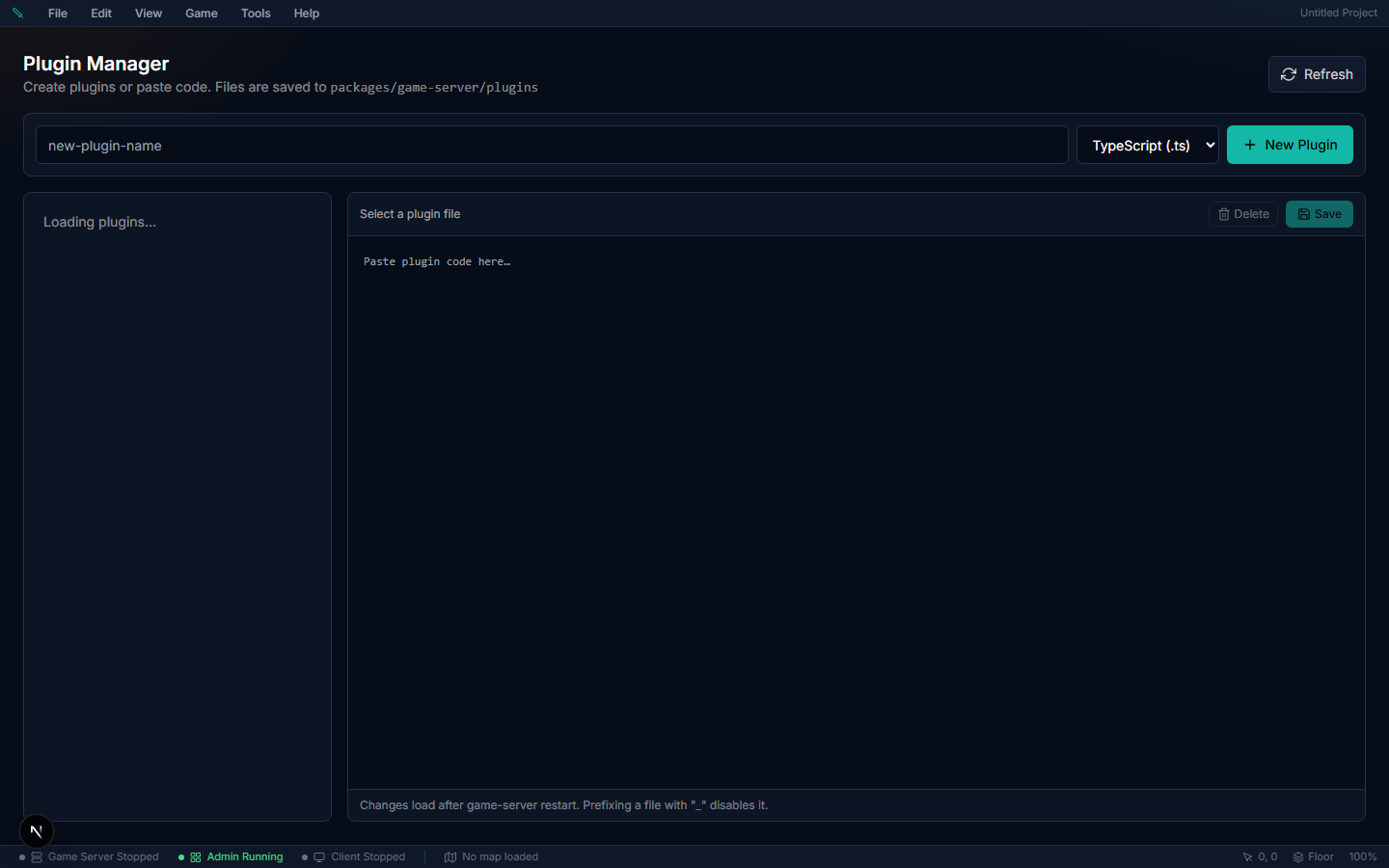
You can also create Tier 0 plugin files directly on disk. The folder decides whether a file is a server or client plugin — not its extension. Both folders are read from the game-server package root and from your project data directory (ED5_PROJECT_DATA_DIR).
| Type | Folder | Extensions loaded |
|---|---|---|
| Server plugins | plugins/ | .ts and .js |
| Client plugins | client-plugins/ | .js only |
So a .js file in plugins/ is a server plugin, not a client widget.
Turning Trusted File Plugins On#
Where to author it: not in the editor. It is one line in the .env file of the game server (the file next to package.json in your exported server bundle).
| Where your game server runs | What to do |
|---|---|
| Desktop app (Play, Test Play, the local server) | Nothing. Studio turns it on for the local server on your own computer, so the files in your project's plugins/ folder load when that server restarts. |
| Your own server (see Self-Hosting on a VPS) | Follow the steps below. |
| Managed hosting | Not available. Rewrite the plugin as a project plugin (the sandboxed ed5.* API) on the Plugins page. |
Steps for a server you host yourself:
- Copy your plugin files into
packages/game-server/plugins/on the server. An export does not copy your project'splugins/folder for you. - Open the server's
.envfile and add the lineED5_ALLOW_TRUSTED_PLUGINS=1. The bundle's.env.exampledoes not list it yet — type the line in yourself. - Restart the game server.
- Open Studio → Status. If there is no Boot errors entry named
plugins.trusted, the files were not refused. The server log lists each one it loaded (✓ Loaded "my-plugin" v1.0.0).
| Setting | Values | What it does |
|---|---|---|
ED5_ALLOW_TRUSTED_PLUGINS | 1 or true = on. Anything else, or not set = off | Lets the game server load the .ts / .js files in its plugins/ folders at start. Read once, when the server starts. Ignored on managed hosting. |
If plugin files are there but the switch is off, the server still starts, without them. It says so in two places:
- Studio → Status → Boot errors shows a
plugins.trustedentry that names each file that was not loaded and tells you how to turn the switch on, or to rewrite the plugin for the sandbox. Like any boot error it turns the verdict banner to Needs attention until the entry is gone. - The server log has one error line with the same text and the folders it looked in.
To make the entry go away without turning the switch on: delete the file, or rename it with a leading underscore. If you still want what the plugin did, rewrite it as a project plugin (the sandboxed ed5.* API) first. Publishing the file as it is does not work: it was written against ctx.*.
Gotchas:
- A plugin file that used to load on your own server no longer does after updating the game server. Add
ED5_ALLOW_TRUSTED_PLUGINS=1to the server's.envand restart. The Status page shows aplugins.trustedboot error until you do. - The switch belongs to the server, not the project. Publishing, syncing or exporting never turns it on, and nothing in the editor can.
- Managed servers ignore it. There is no setting for it under Game server settings.
- The desktop app loads every plugin file in the project it opens. Opening a project folder someone else gave you runs the files in its
plugins/folder on your computer when the local server starts. Only open projects you trust. - Client plugin files are not affected. Files in
client-plugins/are sent to players as before. - Underscore files are not reported. A file whose name starts with
_is switched off and is neither loaded nor listed as a boot error. - There is no feature flag — the switch is a setting of the server, not of your world.
Auto-Loading (Tier 0)#
When trusted file plugins are turned on (see Turning Trusted File Plugins On above; the desktop app does this for you), file-based plugins load when the server starts. Create a file (or use the built-in editor) and restart the server.
Naming Rules#
| Pattern | Behavior |
|---|---|
plugins/my-plugin.ts (or .js) | Server plugin — loaded at start when trusted file plugins are turned on |
client-plugins/my-widget.js | Client plugin — sent to all connected players |
_disabled-plugin.ts | Skipped (underscore prefix disables), in either folder |
Your First Server Plugin (trusted / file-based)#
The rest of this section documents the trusted ctx.* API used by local file plugins. (Sandboxed plugins use ed5.*, shown above.) Create a server plugin as a .ts file in plugins/ (or in the editor):
import type { PluginDefinition } from "../src/core/plugin-system.js";

const plugin: PluginDefinition = {
  name: "welcome",
  version: "1.0.0",
  description: "Welcomes players on login",

  register(ctx) {
    ctx.log.info("Welcome plugin loaded!");

    ctx.eventBus.on("player:login", (e) => {
      ctx.sendSystemMessage(e.playerId, "Welcome to the server!");
    });

    ctx.registerCommand("hello", (entityId, args) => {
      const name = args[0] ?? "adventurer";
      ctx.sendSystemMessage(entityId, `Hello, ${name}!`);
    }, {
      description: "Greet someone",
      usage: "/hello [name]",
    });
  },
};

export default plugin;
Your First Client Plugin#
Create a new client plugin in the Plugin editor (or as a .js file):
ctx.log.info("Stats HUD loaded!");

var widgetId = ctx.createWidget({
  html: buildHtml(ctx.getState()),
  anchor: "top-right",
  position: { x: 16, y: 80 },
  width: 180,
  draggable: true,
  css: "background:rgba(0,0,0,0.75);" +
       "color:#eee;border:1px solid #555;" +
       "border-radius:8px;padding:10px;" +
       "font-family:monospace;font-size:12px;",
});

ctx.onStateChange(function() {
  ctx.updateWidget(widgetId, {
    html: buildHtml(ctx.getState()),
  });
});

function buildHtml(state) {
  return "<div>" +
    "HP: " + state.selfHp + "/" + state.selfMaxHp +
    "<br>MP: " + state.selfMp + "/" + state.selfMaxMp +
    "<br>Gold: " + state.selfSilver +
    "</div>";
}
Plugin Structure#
Every server plugin exports a PluginDefinition object:
interface PluginDefinition {
  name: string;          // Unique identifier
  version: string;       // e.g., "1.0.0"
  author?: string;
  description?: string;

  register(ctx: PluginContext): void | Promise<void>;
  unregister?(): void | Promise<void>;
}
The register function receives a PluginContext — this is the full API for interacting with the game server.
Auto-Cleanup#
All subscriptions, commands, timers, and channels registered through ctx are automatically cleaned up when:
- The server shuts down
- The plugin is disabled or reloaded
The unregister() hook is optional and only needed for external resources.