Adjust combat balance, economy, party sizes, and more.
Tuning Constants
All gameplay numbers are configurable in the Studio's settings. Here are the key values you can adjust.
Movement & World#
| Setting | Default | Description |
|---|---|---|
| Move speed | 4.0 tiles/sec | Base character movement speed |
| Tile size | 64 × 32 px | Isometric tile dimensions (2:1 diamond) |
| Chunk size | 64×64 tiles | World streaming chunk size |
| Elevation scale | 200 px | Vertical pixel offset per elevation unit (controls cliff height) |
| View mode | Isometric | isometric (2:1 diamond) or topdown (square grid) |
| Diorama | Off | Top-down projects only. Real height (raised ground, cliffs, stairs, ladders) seen at a tilt. Not a feature flag: set per project in World → Rendering. See Diorama View. |
Combat Balance#
| Setting | Default | Description |
|---|---|---|
| Global cooldown | 1000 ms | Shared cooldown between abilities |
| Base swing interval | 2000 ms | World base attack cadence for mobs and NPCs (players swing at their weapon's attack speed) |
| Crit chance | 5% | Base critical hit probability |
| Crit multiplier | 1.5× | Extra damage on critical hits |
Social Limits#
| Setting | Default | Description |
|---|---|---|
| Party size | 4 | Maximum party members |
| Guild cap | 50 | Maximum guild members |
| Chat cooldown | 500 ms | Minimum time between chat messages |
Game Limits#
Three hard caps that used to be fixed are now yours to set.
Where you'll find it#
World → Limits, then Save Changes. A save reaches a running game straight away.
Set them#
- Open World and choose the Limits tab.
- Change Character slots per account, Active quests per character and Bank slots per character.
- Press Save Changes. Reset to defaults puts back 5, 25 and 60.
| Setting | Default | Allowed | Where players see it |
|---|---|---|---|
| Character slots per account | 5 | 1 to 50 | The character select screen: how many slots it offers, and the cap on creating another |
| Active quests per character | 25 | 1 to 200 | The quest log header, for example 3 / 25 active, and quest accepting |
| Bank slots per character | 60 | 10 to 1,000 | The bank window: how many different stacks it holds |
Gotchas#
- Lowering a limit never deletes anything. An account with 7 characters keeps all 7 if you lower the limit to 5; it just cannot make an eighth. Quests already accepted stay in the log, and a bank holding more stacks than the new limit keeps all of them but cannot take a new stack until it is under the limit.
- A value outside the allowed range is refused on save, with the range shown. The game server also clamps whatever it loads.
- Stacks, not items. Bank slots count different stacks: ten potions in one stack use one slot.
- Guests use the same character limit on the character select screen.
- Older game builds still stop at 5 characters on the character select screen even if you raise the character limit: the server enforces your number, but only the current game build shows it. Raise it once your players have the current build.
- Hosted games: publish after saving so the hosted game picks the new limits up.
Economy#
| Setting | Default | Description |
|---|---|---|
| Starting currency | 100 silver | Silver given to new characters (silver is the base currency) |
| NPC buy rate | 0.4× | NPCs buy items at 40% of base price |
Crafting Quality#
Quality buckets are creator-defined in the Rarity & Quality editor (rename / recolor / reorder / add your own) — the table below is only the seeded default ladder. Higher crafting skill and better stations increase the chance of rolling higher quality:
| Quality (default ladder) | Stat Multiplier |
|---|---|
| Normal | 1.0× |
| Good | 1.1× |
| Outstanding | 1.2× |
| Excellent | 1.35× |
| Masterpiece | 1.5× |
Crafting stations add +5 effective skill per station tier.
Crafting Stations#
A station is a real object in the world: it takes up space, it can burn fuel, and if a player placed it they can charge others to use it.
Where to Author It#
| What | Where |
|---|---|
| A station item players can place | Items → (an item of type Crafting Station) → Crafting Station Configuration |
| Stations you place yourself | Maps → open a map → Events layer → Crafting Stations — the same tool you place NPCs with |
| Whether players may build off-claim | Maps → open a map → Properties → free placement |
| What counts as fuel | Items → (an item) → Fuel Value |
The Fields#
| Field | What it does |
|---|---|
| Opens Crafting Menu | Which station type this is — forge, loom, smelter, and so on |
| Station Tier | Both the quality bonus (+5 effective craft skill per tier) and the highest tier craftable here |
| Placed Graphic | The map object drawn when placed. This is also its footprint — the object’s tile size is the space it occupies, and its passage grid decides which of those tiles block movement |
| Fuel Capacity | 0 = never needs fuel. Give a forge a capacity and it burns fuel per craft |
| Fuel Value (on any item) | How much fuel that item adds when burned. 0 = not fuel |
Placing One#
Players place stations two ways, and both validate the same rules:
- From the bag — select the item and choose Place Station.
- From the hotbar — assign it to a slot under the Build tab, press the slot key to arm it, then click a tile. Pressing the key again puts it away.
A placement is refused, with the reason, when any tile of the footprint is blocked, occupied by another station or chest, has someone standing on it, or sits outside land the player may build on.
Fuel and Fees#
A fuelled station shows a gauge in the world and in the crafting window, and refuses to craft when empty. Anyone can top one up — refuelling is a gift, not a right. Fuel is only ever consumed in whole items, so topping off a nearly full forge won’t waste the rest of your charcoal.
The owner may set a fee (up to 50%) charged as a share of the materials going in. Friends, guildmates and fellow claim members are waived by default, and alliance members can be too. The fee collects on the station rather than paying the owner directly — they come and collect it.
Placing Them Yourself#
Stations go down with the same event tool you place NPCs with: open a map, switch to the Events layer, and pick from the Crafting Stations group. Only items authored as a station appear there — the item carries the type, tier, graphic and fuel capacity, so an editor-placed station and a player-placed one are the same thing authored once.
Stations you place belong to the map: they never charge a fee and players cannot pick them up. Drag one off the map and it is removed on save; stations players placed are left alone.
Gotchas#
- Stations must go on land you own — a housing plot or a land claim you may build on — unless the map has free placement switched on.
- The graphic decides the space. A 3×2 forge reserves six tiles even if players can walk through its front row, so nothing else can be placed overlapping it.
- A station in use can’t be picked up, and you must collect its earnings first.
- The fee is charged when the craft starts, so an over-tier attempt that then fails still paid to use the station — the forge was fired either way.
- Set Fuel Capacity to 0 for stations that shouldn’t need fuel; there is no separate on/off switch.
- Stations authored in the editor are creator-owned: they never charge a fee and players can’t pocket them.
Craft Tiers#
What tier a crafter can make is two gates, and the lower one wins:
- The skill's tier ladder — what they have learned. Authored per skill under Skills → (a skill) → Craft Tiers: set T2 to unlock at level 5 and anyone at level 5 in that skill can make T2 goods, at any station.
- The station's tier — what the equipment permits. A placed station takes its tier from its sprite (
forge_t3= tier 3); an NPC station uses its authored tier. A station with no tier in its name imposes no ceiling, so adding a ladder never quietly caps your existing forges at T1.
Players pick the tier in the craft window. Materials must match the chosen tier exactly — crafting T3 needs T3 ore, and 40 units of T5 ore will not do. That is what gives each tier its own material economy instead of letting high-tier stock satisfy everything.
Crafting Above Your Rating#
Exactly as a gathering tool works one tier under a node, a crafter may attempt one tier above their effective rating. It costs them:
| Setting | Default | Effect |
|---|---|---|
overTierCraftFailurePct | 25% | Chance the craft fails outright |
overTierCraftFailureRefundPct | 0% | Materials handed back on a failure — raise it if losing the lot feels too harsh |
overTierCraftQualityPenalty | 40 | Effective-skill deficit on the quality roll, so a successful over-tier piece still comes out poor |
Gotchas#
- A skill with no ladder gates nothing. Leave Craft Tiers empty and that skill crafts at any tier the materials allow, exactly as before this system existed. The station tier is ignored too — the ceiling only applies once you author a ladder.
- Removing a rung removes every rung above it. Tiers are positional, so the editor only lets you drop from the top.
- The output item’s own tier band still applies. A recipe whose result is banded T1–T3 cannot be crafted at T5 however skilled the crafter, and the tier buttons for it stop at T3.
- The over-tier craft still needs the higher-tier materials. Materials decide what is being made; the skill gap is what you are penalised for.
- Tier 1 is always craftable, even below the ladder’s first rung — a fresh character can always make something.
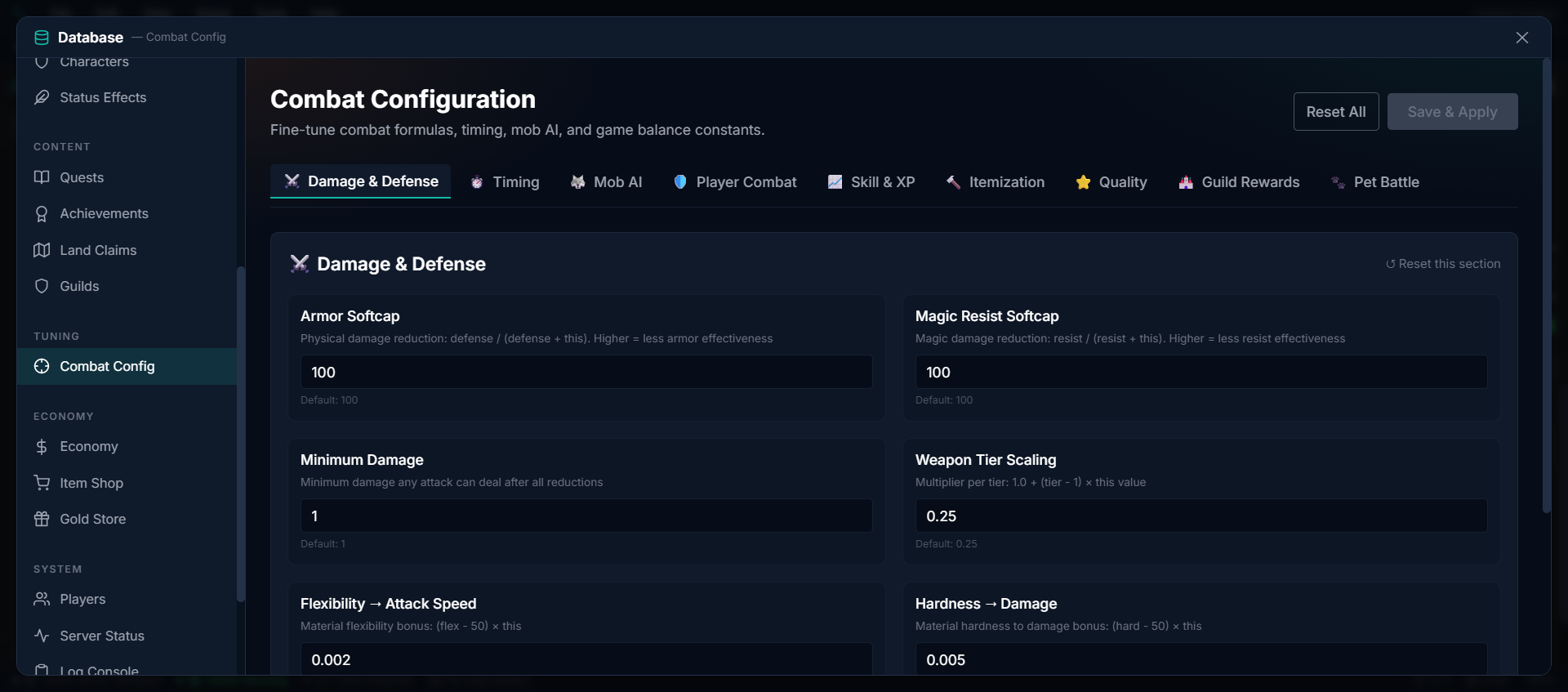
Weapon Tier Scaling#
Weapon tier scaling is linear — 1.0 + (tier − 1) × step, across 8 tiers (T1–T8). The per-tier step (weaponTierScaling) is a tunable constant; the default is 0.25, giving the curve below. Lower it for a flatter power band, raise it for a steeper endgame:
| Tier | Damage Multiplier |
|---|---|
| T1 | 1.0× |
| T2 | 1.25× |
| T3 | 1.5× |
| T4 | 1.75× |
| T5 | 2.0× |
| T6 | 2.25× |
| T7 | 2.5× |
| T8 | 2.75× |
Zone Tier Constants#
The zone-tier system’s knobs live under Combat → Itemization. See Zone Tiers for what they do.
| Setting | Default | Effect |
|---|---|---|
maxTier | 8 | The world’s highest tier. Caps every zone tier, spawn and drop. Raise it to add tiers above 8 — bands, zone tiers and drop rolls all follow it, and the per-tier scaling table above simply continues |
itemTierStatScaling | 0.25 | Stat step per tier above an item’s Min Tier |
mobTierHpScaling | 0.25 | Mob HP step per tier above 1 |
mobTierDamageScaling | 0.25 | Damage step per tier for unarmed mobs (an armed mob’s damage comes from its weapon’s tier instead, so the two never stack) |
tierDropSpread | 2 | How far below the map tier a drop may roll |
tierDropWeights | 60, 30, 10 | Roll weights across that window, lowest tier first — so the map’s own tier is the rare one |
Gathering Tools#
| Setting | Default | Effect |
|---|---|---|
autoEquipHarvestTools (Combat → Itemization → Auto-Equip Gathering Tools) | On | A player who starts gathering without the right tool in their Tool slot gets the best usable one from their bags equipped for them. Off = they equip it by hand. See Gathering Tools & Auto-Equip |
Farming#
| Setting | Default |
|---|---|
| Tillable surfaces | Soil, Grass, Dirt (per-crop preferredBiomes refine where each crop thrives) |
| Growth stages | Per-crop (typically Seed → Sprout → Growing → Mature → Harvestable, with a Withered end state) |
Housing#
| Setting | Default |
|---|---|
| Default land claim | 16 × 16 tiles (configurable per world) |
| Default plot | 8 × 8 tiles |
| House interior | 20 × 20 tiles |
| Max placed entities per plot | 200 |