Day/night cycle, weather, seasons, and survival.
Environment
The environment system creates a living world with time of day, weather, seasons, and optional survival mechanics.
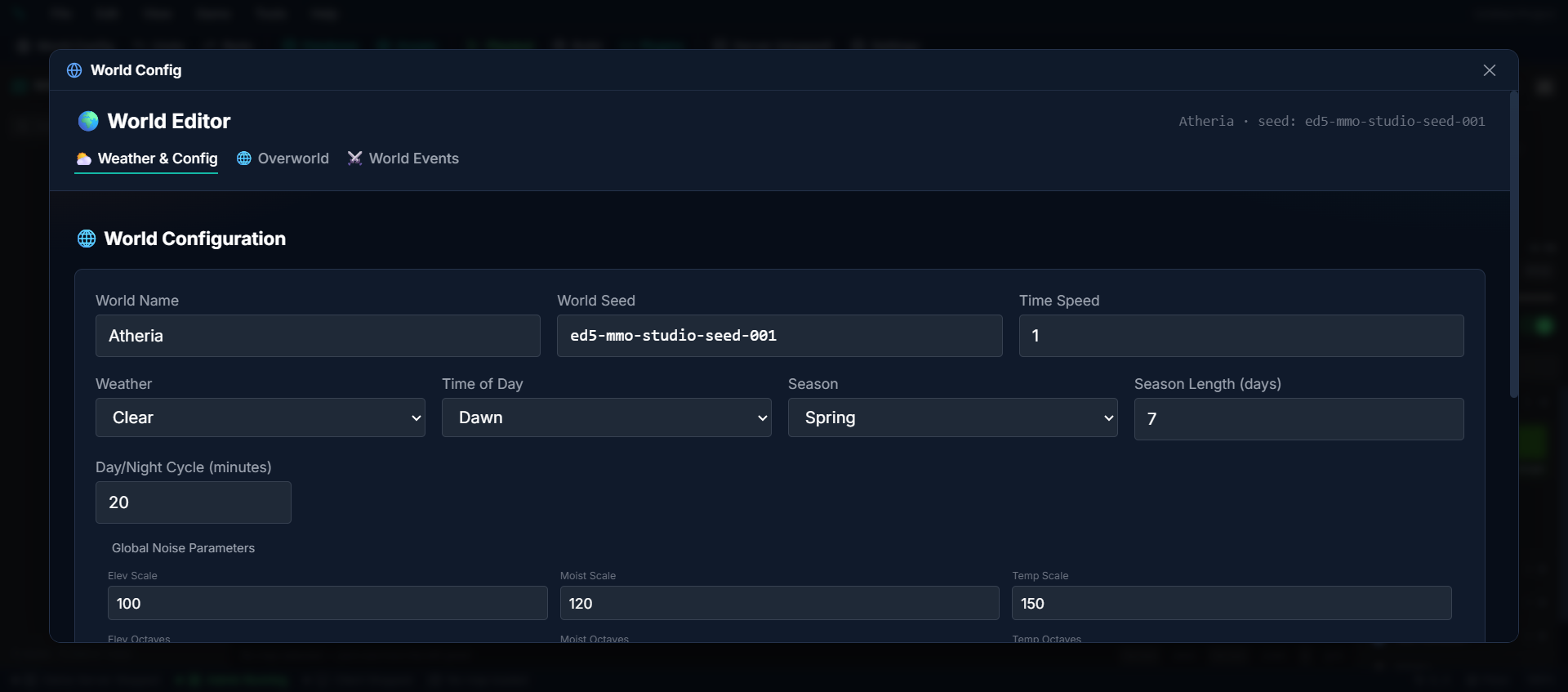
Day/Night Cycle#
The world progresses through 6 time phases:
| Phase | Description |
|---|---|
| Night | Dark, reduced visibility, nocturnal mobs active |
| Dawn | Transitioning to daylight |
| Morning | Full daylight begins |
| Noon | Brightest light |
| Afternoon | Light softens |
| Dusk | Transitioning to dark |
The cycle length is configurable — one in-game day can be minutes or hours of real time.
Where the clock starts#
A world opens at midday — 12:00, full daylight. That is the starting point whether the cycle is running or not.
With the Day/Night Cycle turned off, the clock simply never moves: your world stays at midday permanently, brightly lit, with no night to wait out. That is the point of switching it off.
To hold a world at some other fixed time — a city that is always night, a dungeon frozen at dusk — leave the cycle off and pin the time with the Set Time event command (or the admin time control). Pinning works with the cycle disabled; only the automatic progression is suppressed, so the time you set is the time it stays.
Weather#
9 weather types that affect gameplay and visuals:
| Weather | Effects |
|---|---|
| Clear | Normal conditions |
| Cloudy | Overcast skies, dimmer light |
| Rain | Reduced visibility, waters crops |
| Storm | Heavy rain, lightning |
| Fog | Greatly reduced visibility |
| Snow | Cold temperature, reduced movement |
| Heatwave | High temperature (+18°) — players overheat without Heat Resist |
| Blizzard | Extreme cold, near-zero visibility |
| Sandstorm | Blowing sand, low visibility |
Weather transitions smoothly over time, and every weather carries an intensity (0–1) that ramps in and out — a storm that arrives naturally starts light and builds instead of snapping on at full strength. (The event-command "Set Weather" action uses a smaller scripted subset — None, Rain, Storm, Snow, Fog, Sandstorm — for one-off cutscene effects.)
Weather Schedules#
Author guaranteed (or probable) weather windows in **World Config → Weather & Time → Weather Schedules** — "every autumn evening at 18:00, a storm rolls in for 3 hours":
- Click New Schedule and pick the Weather Type and Season (or All Seasons).
- Set the window: Start Hour (0–23, in-game clock) and Duration in hours. Windows
may wrap past midnight.
- Set Probability —
1fires every day,0.25roughly one day in four. The roll ismade once per day per schedule, so a window never flickers on and off.
- Shape the Intensity Curve: Peak (how hard it blows at the plateau), Ramp in
and Ramp out in minutes — the drizzle-to-downpour-to-tapering arc.
- Save. The live server picks the schedule up immediately.
| Field | What it does |
|---|---|
| Weather Type | What the window forces while active |
| Season | Only fires in this season (All Seasons = year-round) |
| Start Hour / Duration | The in-game window; wraps past midnight |
| Probability | Chance (0–1) the window fires on a given day — rolled once per day |
| Peak intensity | Plateau strength 0–1 (a light drizzle never has to reach 1) |
| Ramp in / out (min) | Minutes to build from calm and to taper before the window closes |
Outside scheduled windows the world keeps its normal seasonal weather rolls. A calendar event's forced weather outranks schedules for its whole day.
Snow cover, ice and snow on objects#
When a snowy weather (Snow, Blizzard, or any weather whose Accumulation is set to Snow) runs in an area, snow builds up over time and melts after it stops. Every player sees the same amount — it comes from the server.
Where you author it#
- Studio → World → Atmosphere → Weather visuals — per weather type: Accumulation, *Accumulation
rate*, Melt time, Accumulation color, Accumulation texture, Wash color/alpha, Fog bands.
- Studio → World → Atmosphere → Accumulation exclusions — tilesets that never take snow.
- Studio → World → Weather climates — which areas get snowy weather in which season.
- Studio → World → Weather → Snow look — the colours and feel of the snow itself (see
Customise the snow look below).
How to set it up#
- Give an area a climate whose season includes Snow or Blizzard (Weather climates).
- Optional: in Weather visuals, tune the Snow / Blizzard accumulation rate and melt time.
- Optional: add road or indoor-floor tilesets to Accumulation exclusions so they stay clear.
- Play in that area during the season and let the snow build up.
What takes snow#
| Surface | What happens | How the engine recognises it |
|---|---|---|
| Ground (grass, dirt, A2 / A5 tiles) | Snow that builds up from the rises of the ground into one clean blanket, shaded blue in its hollows and along every edge | Anything not listed below |
| Paths and paving (tilesets named path, road, trail, street, paving, cobble or dirt; walkable RPG Maker A5 cells that aren't grass) | Trodden snow — a shade darker than fresh cover | Name, or the cell's own art |
| Roofs and wall tops (RPG Maker A3 roof rows, A4 "Top" tiles, Roof autotiles) | Full snow, with a lumpy lip hanging over the edge onto the wall below | A3/A4 sheet layout, tileset name "Roof"/"Top", or autotile type Roof |
| Wall faces and cliffs (A3/A4 wall rows, Wall / Cliff autotiles, wall tilesets, impassable RPG Maker A5 rock) | Their own art, cooled slightly, with a drift banked against the foot. Rock and cliff faces also hold snow on their ledges and frost creeping down from the top | A3/A4 sheet layout, tileset name "Wall", wall tileset type, autotile type Wall/Cliff |
| Water (RPG Maker A1 sheet, Animated Water / Waterfall autotiles, tilesets named water, lake, river, sea, pond, swamp) | Freezes to translucent pale ice with hairline cracks, sparse soft drifts of snow and a crisp snow rim along the shore | Same |
| Lava (tilesets named lava or magma) | Stays bare | Name |
| Objects (trees, fences, rocks, houses, overhead pieces) | Thick, clumpy white caps on every upward-facing top, and the rest of the object goes colder under them | Automatic, from the object's art |
| Objects hung on a wall (a window grate, banner, sign or door whose base sits on a built wall face) | No snow: snow can't lie on a vertical wall. Something standing on the ground in front of a wall, like a statue at its foot, still gets its caps, and so does anything on a natural rock face | Automatic, from the cells under the object's base |
| Floors players paint on a claim (paving, wooden floors, the decals on them) | The same snow as the ground around them, trodden paths and footprints included. Under a roof — a player's house or one of your buildings — the floor stays bare | Automatic |
| Roofs (houses players build with the wall builder, and the roofs of your own buildings) | Snow on every facet in your snow colours, the sunlit side brighter than the shaded one. A roof that fades while a player stands under it fades its snow with it | Automatic, the same amount as objects |
| Resource nodes and crafting stations (harvestable trees, ore rocks, plants; a forge or workbench standing outside) | The same caps and frost as the objects around them, at the same depth. A node keeps its snow while it is being harvested, and its depleted look (a stump, a spent rock) gets snow of its own. A monster's carcass and doors stay bare | Automatic, from the node's or station's art |
| Objects players place on a claim (a fence, a crate, a stall and its awning — single objects and the object cells of a multi-cell build part) | The same caps and frost as the map objects beside them, at the same depth. A piece of several stacked cells is snowed as one shape: one cap along its top, not one per row. Snowed the moment it is placed, gone the moment it is removed. A piece under a roofed building stays bare | Automatic, from the piece's art |
Gotchas#
- Players choose how much they see (Settings → Graphics → Weather). Low draws the snow cover,
ice and a lighter object snow. Medium (the desktop default) adds drifts banked against walls and cliffs, a blue contact shadow at their foot, the lip over wall tops and snow drifting on frozen water. High and Ultra also bank drifts against the base of objects (houses, fences, trees), on the lee side of the wind, and add glints. Off removes all snow cover, ice and object snow.
- Tiles and builder walls are not snowed yet. Floors, walls and roofs that a build part lays as tiles, tiles a player paints, and the walls, floors and roofs drawn by the wall-and-roof builder sit above the ground snow and stay bare. If you want a structure to turn white in a snowy climate, build it from object pieces.
- RPG Maker A5 cells are read from their art. An impassable A5 cell that looks like earth or rock is
treated as a cliff face and keeps its art; a walkable one that isn't grass is treated as a path. If a custom A5 sheet comes out wrong, add its tileset to Accumulation exclusions.
- Custom tileset names matter for water. A water tileset that is not RPG Maker A1, has no Animated
Water/Waterfall autotile type and no water-like word in its name is treated as ground and gets snow. Rename it (e.g. "Pond water") or set its autotile type.
- Wash and fog are capped during snow. A large Wash alpha on Snow/Blizzard no longer turns the
screen white — the combined haze is capped so characters stay readable. Fog-type weathers keep more.
- Indoors (interior zones) nothing is drawn; the snow outside is still there when you step out.
Customise the snow look#
The snow in your world doesn't have to look like everyone else's. Give it warmer or colder tones, make it cover everything or only lie in patches, let it melt in minutes or linger for days, and decide whether it sparkles and takes footprints. A snowy region can look different from the rest of the world — a glittering tundra in the north, grey slush in the lowland towns.
Where you author it#
Studio → World → Weather → Snow look, below Climates. Changes ride the page's **Save Changes**, and players already in the world see the new look straight away — no restart, no relog. A Publish carries it to your live server the same way.
How to set it up#
- Open World → Weather and scroll to Snow look.
- Pick a Preset to start from — Default, Powder, Tundra ice, Wet slush or
Storybook.
- Tune it: pick the four snow tones and the Ice tint, drag the sliders, and switch
Footprints and Sparkle on or off. The Preview redraws as you go.
- Optional, if you have climates: change Editing from World look to a climate and adjust
it. That climate only stores the settings you change, so it still follows the world look for everything else.
- Click Save Changes, then walk into falling snow in the game to see it.
Reset to default puts the world back on the engine's own look. With a climate picked, the same button reads Use the world look and drops that climate's own settings.
Snow look fields#
| Field | What it does | Range |
|---|---|---|
| Preset | Fills every field below from a starting look. Shows Custom once you change anything | Default, Powder, Tundra ice, Wet slush, Storybook |
| Editing | Whether you are changing the world look or one climate's own look. Only shown when you have climates | World look, or any climate |
| Highlight tone | Colour of the sunlit tops of the snow | Any colour |
| Mid tone | The main colour of the snow | Any colour |
| Shade tone | Shaded sides and hollows | Any colour |
| Deep tone | The darkest creases, the edges of patches and the underside of lips | Any colour |
| Ice tint | Colour of frozen water | Any colour |
| Coverage | The most the snow ever covers. 100% is a full white blanket; lower keeps grass showing between patches however long it snows | 0–100% |
| Patch size | Small speckled patches at 0.5×, big soft blankets at 2× | 0.5×–2× |
| Build speed | How fast snow settles while it falls, on top of the weather's own Accumulation rate | 0.25×–4× |
| Melt speed | How fast settled snow melts once it stops, on top of the weather's own Melt time | 0.25×–4× |
| Wind drifts | How much the wind banks snow against walls and edges | 0–100% |
| Trodden paths | How clearly roads and paths show through the snow. 0% buries them | 0–100% |
| Wall frost | Frost on wall faces | 0–100% |
| Snow on objects | How thick the caps are on roofs, rocks, trees and wall tops | 0–100% |
| Cliff ledges | Snow gathered on cliff and ledge tops | 0–100% |
| Ice strength | How strongly the ice tint shows over frozen water | 0–100% |
| Footprints | Players leave prints in the snow | On / Off |
| Footprints last | Seconds a print takes to fill back in. Greyed out while Footprints is off | 1–600 s |
| Sparkle | Glints on fresh snow in the light | On / Off |
Gotchas#
- Keep the four tones light to dark, Highlight → Deep. Out of order, patches look inside out.
Blue-leaning shades read as snow; grey or warm shades read as slush or dirt.
- The look only shows where it snows. It changes how snow looks, not whether it falls — that
is still up to your weather and Climates.
- Players' graphics settings still apply. Sparkle, drifts and some object caps need Medium or
higher in Settings → Graphics → Weather, and Off hides all snow whatever you set here.
- The preview is a sketch to judge colours and balance, not a screenshot. Check the real
thing in the game.
- A climate's own look only stores what differs. Change the world look later and the
climate follows it for every setting you left alone.
- Out-of-range values are refused, not clamped when a tool or the Studio AI sets the look
(for example Coverage 2, or a colour that isn't a hex like #DCE6F0) — the save fails with the field that is wrong.
- Game servers from before this feature ignore the look and keep the default snow; update the
server to see it.
Seasons#
4 seasons cycle throughout the year:
| Season | Effects |
|---|---|
| Spring | Crops grow faster, certain herbs available |
| Summer | Longer days, higher temperatures |
| Autumn | Harvest season, resource bonuses |
| Winter | Shorter days, cold, snow |
Seasons affect farming, mob spawns, and ambient temperature.
By default the four seasons rotate on a fixed Season Length (days). Author a Calendar and that changes: your months decide when each season falls, and Season Length is ignored. The seasons themselves keep working exactly as described above — the calendar only changes when they happen.
Seasons can also re-skin your ground — snowy grass in winter, orange leaves in autumn — without repainting a map. See Season Sheets.
Dynamic Lighting#
The game client renders dynamic lighting:
- Ambient occlusion — shadows under objects
- Point lights — torches, campfires, glowing items
- Day/night color tinting — scene shifts warm to cool
- Bloom — bright light sources glow
- Weather particles — rain, snow, fog layers
Want night darker, or a different palette for dusk? You control exactly how each phase and each weather type looks in Atmosphere & Lighting, and how everything in the world casts a shadow in Shadows.
Survival System#
When the survival feature flag is enabled, players must manage:
| Vital | What Happens If Empty |
|---|---|
| Hunger | Hungry → Starving → HP loss |
| Thirst | Thirsty → Dehydrated → HP loss |
| Temperature | Cold / Hot → damage over time |
| Stamina | Spent by abilities, and by running if you turn that on (Combat Config → Stamina) |
Players restore hunger and thirst by eating and drinking, and fight the cold or heat with Warmth and Heat Resist gear or a climate's temperature offset. Turn this off for a more casual experience. See Survival for the drain rates, the conditions and their penalties, food and drink fields, and the gotchas.