Player marketplace, direct trading, and shops.
Market & Trading
ED5 includes a player-driven economy with marketplace listings, direct trading, NPC shops, and premium stores.
Player Marketplace#
Players trade with each other through a market. One side lists items for sale, the other posts buy orders, and the two meet.
| Feature | Description |
|---|---|
| Sell order (listing) | Put an item, or a whole stack, up at a price. It sells for that price or not at all. It rests for 72 hours, then comes back |
| Buy order | Name the most you will pay per item, and how many you want. You never pay more. The silver is held until the order fills, is cancelled or expires |
| Sell now | Sell straight into the best buy order, at whatever it pays, instead of waiting for a buyer |
| Automatic matching | A listing priced at or under a waiting offer sells to it on the spot |
| Tax | The market keeps a cut of every sale (5% by default) |
| Search | Browse by type, rarity and price |
| Price history | Per-item candlestick charts built from real trades |
In game the market is a searchable trading terminal: filter the item list, open an item to see its listings, its buy orders and its price history, and buy, sell or post an order from the same panel. The top of the window names the market that is open.
Markets by place#
A world starts with one World Market that everybody shares. You can split trade up by place, like separate city markets: what is listed in one market is only for sale in that market, so goods have to be carried between them and prices can differ from town to town.
| Market | Who gets it | Where to turn it on |
|---|---|---|
| World Market | Anyone standing on ground no faction market covers | Nothing to do — it is always there |
| Faction market | Anyone standing on that faction's territory | Database → Factions → the faction → Identity → Runs its own market |
| Local market | Anyone talking to that one auctioneer | Database → NPCs → the NPC → Behavior → Auctioneer → Local market |
Give a faction its own market
- Open Database → Factions and pick the faction. See Factions & Law.
- On the Territory tab, check that it owns the ground the market should cover: a whole map, or a painted region inside one.
- On the Identity tab, tick Runs its own market. Type a Market name if you want one; blank uses the faction's name followed by "Market".
- Save, and publish on a hosted game.
From then on the Market button, the market hotkey and any ordinary auctioneer open this faction's market for a player standing on its territory, and the World Market everywhere else.
Give an auctioneer its own market
- Open Database → NPCs and pick the NPC.
- Under Identity → Roles, tick Auctioneer. An Auctioneer card appears under Behavior.
- On that card, tick Local market. Type a Market name if you want one; blank uses the NPC's name followed by "'s Market".
- Save, place the NPC on a map, and publish on a hosted game.
Two auctioneers with Local market ticked show two different boards. An auctioneer with it unticked opens the market of the ground it stands on.
| Field | Where | What it does |
|---|---|---|
| Runs its own market | Factions → Identity | On: opening the market on this faction's territory opens the faction's own market |
| Market name | Factions → Identity | The name at the top of the market window. Blank = the faction's name followed by "Market" |
| Local market | NPCs → Behavior → Auctioneer | On: this NPC opens a market of its own instead of the ground's |
| Market name | NPCs → Behavior → Auctioneer | The name at the top of the market window. Blank = the NPC's name followed by "'s Market" |
Buy orders and Sell now#
- Posting a buy order — open an item on the Browse tab (search for it if nobody has listed one yet), fill in Quantity and Most to pay each under Buy order, and press Place buy order. The silver for the whole order leaves the wallet and is held. The price is a ceiling: the order never pays more than it for an item.
- Selling into one — on the Sell tab, pick an item. If somebody is offering silver for it, a Sell now button shows what you would receive after the market's cut. The same offers are listed under Highest offers when you open the item on the Browse tab.
- Part fills — an order for 20 can be filled 5 at a time by different sellers. It stays open, holding silver for what is still wanted.
- Automatic matching — a listing priced at or under a waiting offer sells to it immediately, at the listing's price, and the buyer gets the difference back. Stacks are sold whole, so a stack of 10 never fills an order that only wants 4.
- Delivery — the item goes to the buyer's bag, or to their mail when they are offline or the bag is full. The seller's silver goes to their wallet, or to their mail when they are offline.
- Cancelling — My orders lists every open listing and buy order, including ones resting in another market, and any of them can be cancelled from anywhere. A cancelled buy order returns the silver it still holds.
What each order will and will not do#
Every order has one price and keeps to it. Nothing sells or buys at a price its owner did not name.
| Order | The price is… | So it… |
|---|---|---|
| Sell order (listing) | Exactly what the item sells for | Sits on the board until somebody buys it at that price, or a buy order offers at least that much. It never sells for less, whatever rivals list at |
| Buy order | The most it pays per item | Takes any listing at or under its price, and pays that listing's price. It never pays more |
| Sell now | Whatever the best buy order pays | Sells at once. This is the only way to sell below your own asking price, and it only happens when you press it |
| Buy lowest | The cheapest listing's price | Buys at once |
Gotchas#
- A faction market needs territory. Ticking Runs its own market on a faction that owns no ground does nothing — there is nowhere to stand to open it.
- Painted regions win. Where a faction claims a painted region inside a map another faction owns, the region's faction decides the market.
- Turning a market off does not move its orders. If you untick Runs its own market or Local market, or remove the auctioneer, orders already resting there can no longer be bought. Their owners still see them under My orders and can cancel them from anywhere; anything left expires after 72 hours and comes back by mail.
- A listing is bought where it rests. A player who walks to another market still sees their own orders, but cannot buy another player's listing from there.
- The window follows the player. Walking out of a market with the window still open does not let anyone keep trading there: the next thing they try is refused, and the window switches to the market they are standing in.
- Buy orders refuse worn items. An item below full repair cannot be sold into a buy order, because the buyer agreed a price without seeing it. Repair it, or list it for sale instead.
- Limits. One character may hold 30 open buy orders, each for at most 9,999 items.
- Price history is shared. The chart and recent trades for an item cover every market in the world, not only the one that is open.
- Publish. Faction and NPC market settings reach players on the next publish.
- Feature flag. All of this rides the Market flag (World → Features). With it off, nobody can open any market.
Direct Trading#
Two players can open a trade window to exchange items and gold:
- Player A requests a trade with Player B
- Both add items and/or gold to the trade window
- Both confirm
- The server validates everything and swaps items atomically
Currency Exchange#
An order-book system for converting gold ↔ premium currency:
- Players place buy or sell orders
- Orders match automatically
- Exchange rates are determined by player supply and demand
NPC Shops#
NPC merchants sell items at configured prices and buy player items at a reduced rate:
- Sell price — base price × shop markup
- Buy price — base price × buy multiplier (default: 0.4×, i.e. 40% of base price)
- Stock — configurable quantity with restock timers
- Reputation gating — some items require faction reputation
Premium Shop#
An optional real-money store (ships on; turn it off in World → Features if your game has no monetization):
- Products — individual items or bundles. A bundle's contents can be filled with Add many…, which grants every ticked item in one save
- Scheduling — time-limited availability windows
- Purchase limits — per-account caps
- Promotions — percentage discounts, fixed amount off, buy-X-get-Y
Purchases land in the player's bag. If the bag is full — or the player is offline — the item arrives by mail instead, so a paid purchase is never lost.
Adding a product#
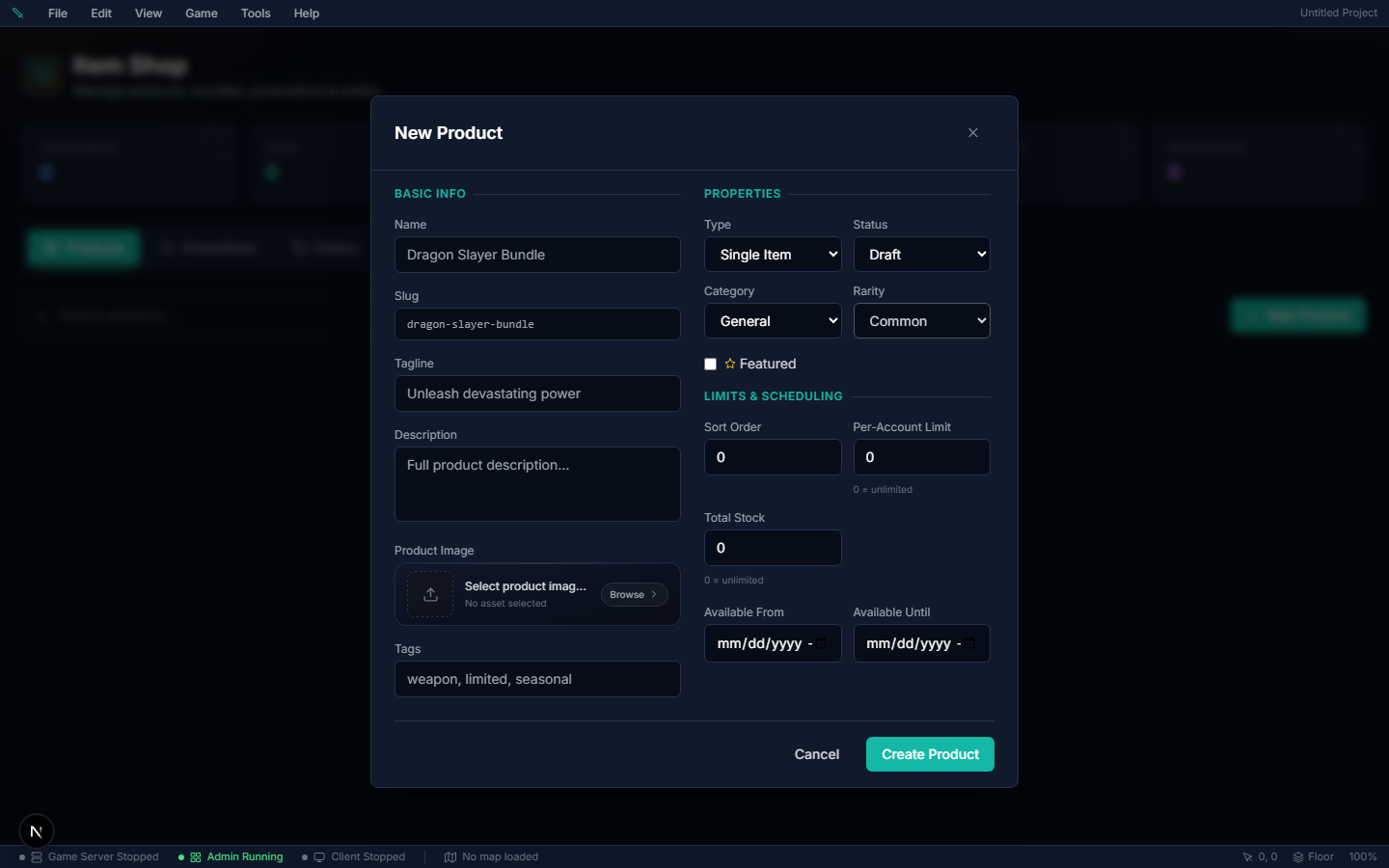
Where to author it: Database → Economy → Item Shop → Products → New Product.
- Click New Product, give it a name, and pick a category and rarity.
- Under Price, enter a Gold price. This is what makes the product buyable with in-game gold. Add a USD price too if you also want to sell it for real money.
- Click Create & Add Items. The items window opens — pick the game item (or, for a bundle, the items) this product hands over.
- Set Status to Active. The items window tells you exactly what is still missing if the product is not showing in game yet.
| Field | What it does |
|---|---|
| Gold price | Cost in account gold. Gives the product its Buy with gold button in game. Leave blank to not sell it for gold. |
| Gold — was | Optional. Shown struck through beside the gold price, for a sale. |
| USD price (cents) | Real-money price in cents — 499 is $4.99. Leave blank to not sell it for money. Needs Stripe or PayPal set up in Settings → Payments. |
| USD — was (cents) | Optional struck-through original price. |
| Product image | Optional picture for the shop card. Leave it empty and the product shows the icon of the item it sells. |
| Status | Only Active products (or Scheduled ones whose window has opened) are listed. |
| Purchase limit / Total stock | 0 means unlimited for both. |
Gotchas:
- A price is what makes a product buyable. Each price you set adds its own buy button in game — gold, or card/PayPal for USD. A product with no price at all is still listed, but nobody can buy it.
- A product with no items sells nothing. Pick its items before you set it Active.
- Clearing a price field removes that price when you save; it does not set it to zero.
- Prices save with the product. If the product saves but the price does not, the message says so — open the product and save again.
- Changes reach players after a publish on a hosted game, like any other content.
Selling cosmetics: make the item a Cosmetic (Items → the item → Visuals), then add a product in the cosmetics category with it as the item and a USD price in cents (99 = $0.99). Players wear it from their bag like any gear — it goes into their wardrobe.
Premium Membership#
The account-wide gold sink that closes the economy loop. Players spend account gold — earned in game, or bought through the Gold Store and traded on the exchange — on a timed membership plan you author (duration in days, price, and perks). While it's active the account gets config-driven perks such as bonus XP and bonus reward silver. Status is account-wide, persisted on the account wallet, and cached for cheap lookups whenever a reward is granted.
Because the gold comes out of circulation, membership is how you keep gold scarce without deleting it by hand.
Gold Store#
Configure real-money → gold conversion tiers with bulk bonuses. Integrates with Stripe/PayPal, with refund clawback and daily purchase caps.
The largest balance the game stores#
Every amount of money in your game is a whole number, and the largest one the game stores is 2,147,483,647 (a little over 2.1 billion). You do not set this anywhere; it is the same in every project. Almost no game ever gets near it, but if yours hands out very large sums, this is what happens at the top.
Where: nothing to author. It applies to the amounts you set in Database → Economy (shops, the Gold Store, the Item Shop), in a template's Starting currency, and to everything players earn and move in game.
| What | The most it can hold |
|---|---|
| A character's silver | 2,147,483,647 |
| An account's gold | 2,147,483,647 |
| A guild bank | 2,147,483,647 silver |
| The silver in one mail | 2,147,483,647 |
| One market listing's price | 999,999,999 silver |
| One Currency Exchange order | Quantity, price, and quantity × price can each be at most 2,147,483,647 |
What players see at the limit#
A payment between players is not paid in part. One that would not fit is refused before anything moves, and the player is told why. Where it is too late to refuse — the other player has already paid — the money waits, whole, until there is room.
| When | What happens |
|---|---|
| A trade would put either player above the limit | The trade is cancelled and nothing changes hands |
| Selling to an NPC shop would put the seller above the limit | Nothing is sold |
| Collecting a mail whose silver would not fit | Refused. The silver stays in the letter, and the letter does not expire while that is the reason |
| A market sale whose proceeds would not fit the seller | The sale goes through and the proceeds arrive by mail |
| A guild bank deposit the bank cannot hold, or a withdrawal the member cannot hold | Refused |
| A Currency Exchange order whose total is too large, or whose proceeds would not fit beside what the player's other orders may still pay | The order is refused, not made smaller |
| An exchange order fills for a player whose wallet has filled up since | The silver (or gold) stays on the order and is paid out when there is room. The player is told, and the order stays in their list until then |
| Cancelling an exchange order whose refund would not fit | Refused. The order stays as it is |
| An exchange order reaches its 30 days while its refund would not fit | It does not expire. It rests, and can still trade, until the refund fits |
| Buying a Gold Store pack that would not fit the account | Checkout is refused, so the player is never charged for gold they cannot hold. Gold they have paid for and not received yet, and checkouts opened in the last day, count |
| A Gold Store payment arrives for an account that has filled up since checkout | Nothing is added and the purchase is put on hold. The player is told to contact you |
A reward — loot, a quest reward, a script that gives silver or gold — is different: it is a top-up, so it is not refused. The balance is kept at the limit, what is above it is not kept, and the player is told they are carrying the most a character can hold.
Gotchas#
- A starting purse above the limit is cut to the limit. A template whose Starting currency is larger than 2,147,483,647 creates characters with exactly that.
- A full wallet does not block a sale on the market. The buyer did nothing wrong, so the item sells; the seller finds a Market Sale letter with the silver in it. See Mail.
- Refused, never trimmed. If a player reports "the exchange would not take my order", check the three numbers: quantity, price, and quantity × price — and whether their other open orders could still pay them enough to fill the wallet.
- An exchange order that looks finished but will not go away is holding money. It shows as partly filled with nothing left to trade. The player spends some silver (or gold) and it is paid out within a minute; they can also cancel it to be paid at once.
- A Gold Store purchase on hold needs you. It only happens when an account fills up between checkout and payment. The purchase keeps the status
paidand the game server's log has a line reading[GoldStore] Purchase … is HELDwith the purchase and the account. Refund the payment at your payment provider: nothing is taken from the player. There is no tool yet that delivers a held purchase — gold you grant by hand is not tied to the purchase, so a later refund would not take it back. - A stop order on the exchange waits for a price it can be paid at. It sells at whatever the best buy order offers; it does not trade at a price where its whole quantity would earn more than 2,147,483,647 silver.
- Prices you author are not checked against this limit one by one. A shop price near the limit is simply a price nobody can pay.
- There is no feature flag — the limit is always on.
Bank#
Personal item storage separate from the bag — 60 slots per character, opened at any NPC with the Banker role. See Bank for bankers, the vault rules and the gotchas.