Design spells, attacks, and skill progression.
Abilities & Skills
Abilities#
Abilities are the actions characters use in combat — attacks, spells, buffs, and special moves.
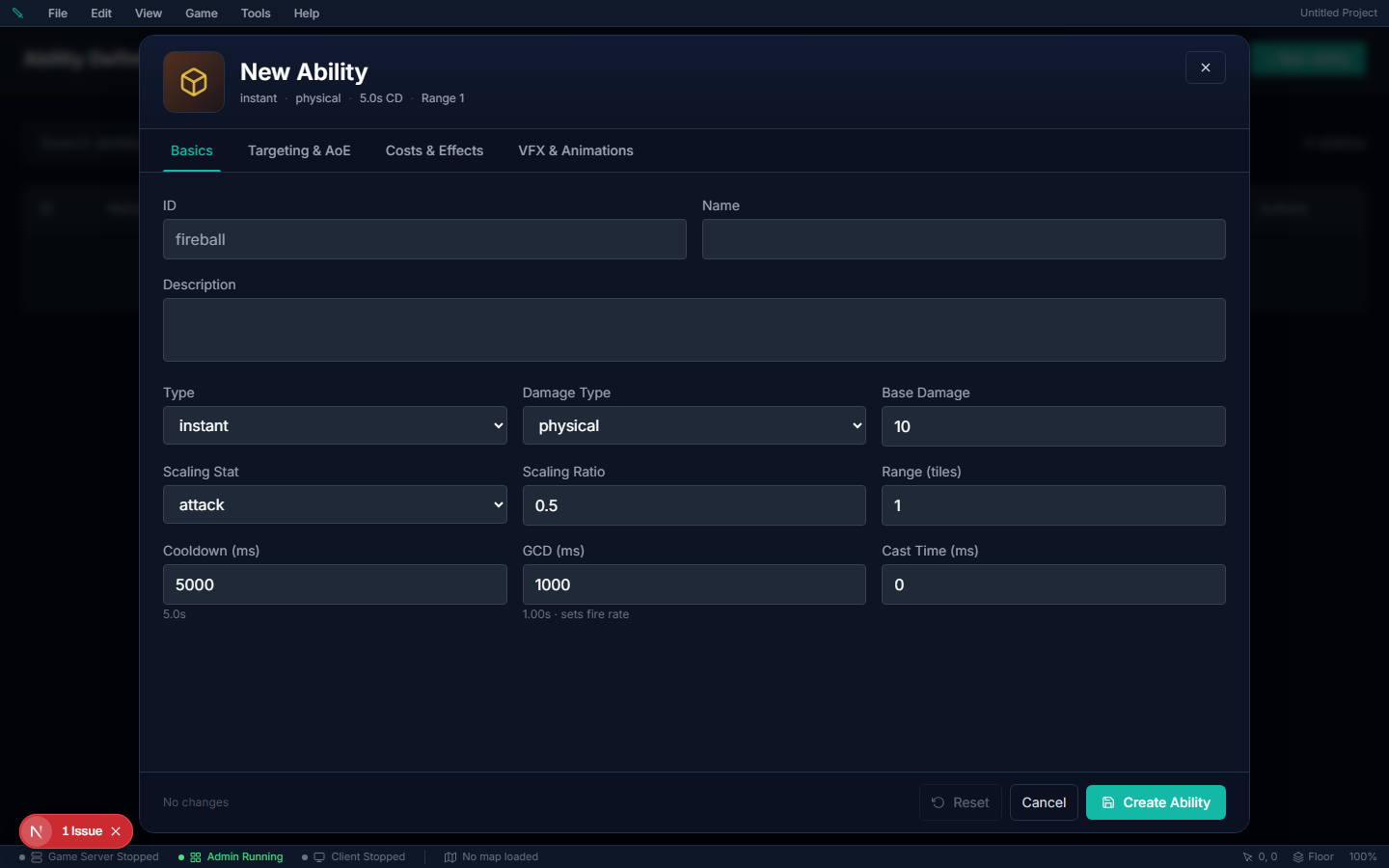
Ability Properties#
| Property | Description |
|---|---|
| Name / Description | What the player sees |
| Type | Instant, Cast (charge-up), or Channel |
| Damage Type | Physical, Magic, or True (ignores defense) |
| Element | Optional — Fire, Ice, etc. Feeds the element effectiveness matrix; separate from Damage Type |
| Base Damage | Flat damage value |
| Scaling Stat | Which stat multiplies damage (Attack, Magic Power, etc.) |
| Scaling Ratio | How much of the stat applies (0.5 = 50%) |
| Cooldown / GCD | Per-ability cooldown, plus the shared global cooldown (gcdMs) |
| Charges & recast | Store several uses, or let the same key cast a follow-up — see Stages below |
| Cast Time | Charge-up time (0 = instant) |
| Mana / Stamina Cost | Resources consumed on use. Stamina comes out of the bar the player sees (the one running drains); too little refuses the cast with "Not enough stamina (need N)." and a cast that is cancelled or cannot land gives it back, like mana. Abilities imported from RPG Maker carry their TP cost here |
| Range | Maximum distance in tiles |
| Target Mode | Enemies, Allies, Party only, Everyone, or Self — see Targeting below |
| Damage modifiers | Execute, bonus vs missing health, % of max health, bonus vs a status, ignores shields — see Damage modifiers below |
| Class / Weapon / Skill requirements | Optional gates on who can use it |
Offering a choice of abilities on gear#
The abilities on a player's bar come from what they wear: the weapon type's primary attack, Q and W, the weapon's own E, and one ability each from head, body, boots, off-hand and cape. Any of those slots can offer several abilities and let the player choose — author the lists under Items → Weapon Types → Ability Slots, Items → Armor Types, or an item's Advanced tab. The first ability in a list is the default; players swap from the item's Abilities tab, out of combat. See Ability & Passive Choices for the full setup.
Damage from a stat alone#
An ability's damage is Base Damage + (Scaling Stat × Scaling Ratio). You can leave
Base Damage at 0 and let the stat do all the work — a spell that hits for
four times your Magic Power is Base Damage 0, Scaling Stat Magic Power,
Scaling Ratio 4. That is exactly how an RPG Maker formula like a.mat * 4 imports.
A spell authored this way is a damage spell in every respect: it fires as a skill shot at the cursor, its Projectile Count volley fires every projectile, and a ranged area bursts where you aim — with or without a target selected.
- Database → Abilities → pick the ability → Basics.
- Set Base Damage to 0.
- Pick the Scaling Stat and set the Scaling Ratio (4 = 400% of the stat).
- Save and publish.
Gotchas:
- A status-only spell needs a Scaling Ratio of 0. A stun or silence with Base
Damage 0 but the editor's default ratio of 0.5 deals damage — and now aims like a damage spell. Set the ratio to 0 for a spell that should only apply its effect. With both at 0 it deals no damage at all and shows no number. It is still an attack: a monster you stun or slow turns on you.
- Heals stay negative. A heal is a negative Base Damage; a 0-base spell aimed at
Allies or Self is treated as a buff, never as an attack, whatever its ratio.
AoE Shapes#
Abilities can hit multiple targets using 9 area-of-effect shapes. The column that decides how a shape behaves is Centred on — whether the area sits on the caster or on the point the ability lands.
| Shape | Centred on | Description |
|---|---|---|
| None | — | Single target only |
| Circle | Aim point | All targets within a radius of where it lands |
| Cone | Caster | Fan-shaped area, pointed at the aim |
| Line | Caster | Narrow beam from the caster out to its range |
| Rectangle | Caster | Rectangular band from the caster toward the aim |
| Ring | Aim point | Donut — outer radius with a hole in the middle |
| Cross | Aim point | Plus-shaped (+) pattern |
| Nova | Caster | A burst covering the ground around the caster |
| Wave | Caster | Expanding arc, pointed at the aim |
Making a blast centred on yourself#
Use nova. It is the shape that means "everything around me".
The trap is that circle looks like it should do this if you set the range low enough. It does not: a circle is centred on the aim point, so with a range of 0 or 1 it still lands on whatever you are aimed at or locked to, and it catches only what is near them — which reads as the spell doing nothing to the enemies packed around you.
To author one:
- AoE Shape → nova.
- AoE Radius → how far the burst reaches, in tiles. This is the number that
matters; the ability's Range does not size a nova.
- Aiming → Free aim if the spell should fire whenever it is pressed.
On Locked, a nova still demands a selected target and is refused with "This ability requires a target" when there is none.
The shape diagram in the editor shows which anchor is in force, and warns you when you have picked an aim-point shape at a range short enough that you probably meant a nova.
To hit several targets one after another instead of all at once — chain lightning, a ricocheting arrow, a cascading heal — see Chaining Abilities.
Where an ability lands: Aiming#
Abilities → (pick one) → Targeting & AoE → Aiming.
| Mode | Where it lands |
|---|---|
| Auto | Your selected target if you have one; otherwise wherever the cursor points. The both-worlds option. |
| Free aim | Always the cursor. A selected target is ignored entirely — the spell is a pure skill shot. |
| Locked | Must have a target. With nothing selected it refuses with "This ability requires a target" — it never fires at bare ground, even with the cursor sitting on an enemy. |
Abilities authored before this dropdown existed keep the behaviour of their old Requires Target checkbox until you pick a mode: checked behaves as Auto, unchecked as Free aim. Nothing changes until you choose.
Gotchas:
- Free aim really does ignore your target. If your fireball keeps flying
past the enemy you have selected, this is why — pick Auto to make a selection win over the cursor.
- Locked can never be ground-cast. A ground-target AoE authored Locked
refuses without a unit, so its area can only ever be centred on a target. For "drop it wherever I aim, but snap to my target when I have one", that is Auto.
Channelled abilities#
An ability whose Type is Channel runs while the key is held: pressing starts the channel immediately, and its Cast Time is the maximum channel duration. With a Channel tick authored (Timing & Feel tab), the effect lands over and over for as long as the key stays down — letting go stops the ticks, and you keep everything already delivered. Each tick repeats the damage and statuses, and of the actions only Displace, Dispel and Convert resource; a Summon, Teleport, Revive or any other action happens once, on the first tick. Without a tick interval, the effect fires once when the channel completes; releasing early interrupts it (and refunds the mana, since nothing was delivered).
Mana, cooldown and the GCD are paid once, when the channel starts — ticks are free, and stopping a channel that already landed ticks does not refund.
A channel can also follow the cursor — a beam you sweep across a pack — with Timing & Feel → Channel follows the cursor (see Stages).
Knockback and pull#
Abilities → (pick one) → Effects → Knockback / pull.
| Direction | What happens to the victim |
|---|---|
| Away (knockback) | Pushed the set distance straight away from you. |
| Toward (pull a set distance) | Dragged the full set distance along the line — deliberately, even past you. A 10-tile pull on something standing next to you yanks it through and out the other side, which is a tool in its own right (throw an enemy behind you, into your group, off a ledge). |
| To the caster (pull all the way in) | Lands one tile in front of you, however far away it was — never behind you. There is no distance to set; the ability's Range still decides who can be hit at all. This is the one to use for a hook that should deliver the enemy to your feet. |
| Field | What it does |
|---|---|
| Direction | Away, Toward or To the caster — see above. |
| Distance (tiles) | How far Away and Toward move the victim, 1–10. Ignored by To the caster. |
| Also apply CC tag | Makes the push crowd control: it obeys knockback immunity, invulnerability and diminishing returns. On by default. |
Gotchas:
- Walls stop every push and pull. The victim travels the line only as far
as it could walk: it stops on the last walkable spot before a wall, a solid object, a shut door or the map edge — never inside one, never through one to open ground on the far side. A pull through a wall stops at the wall.
- Also apply CC tag turns the push into hard crowd control. The fourth
tagged push on the same target inside 15 seconds moves nothing (with **CC Diminishing Returns** on), and a target immune to Knockback is not moved. Turn it off for a shove that should always land.
- The Knockback status effect pushes on its own. Use it when a status —
an element proc, an aura, an event command — should shove someone; use this action when an ability should. Both walk the same wall-respecting line.
- A rooted target is still moved. Root stops a unit walking by itself, not
being thrown.
- Players see the push, not a teleport. The landing spot is decided by the
server instantly, but the victim's sprite slides there from where it stood (and the camera glides after a pushed player). Pushes longer than 6 tiles, and every push for a player with Reduced Motion on, still snap.
- Roll the server after editing — ability definitions load at boot.
Convert a resource (HP into MP, and back)#
Abilities → (pick one) → Costs & Effects → + Add action → Convert resource.
Pays one of the caster's own pools into another: spend health to restore mana, burn mana for stamina, turn stamina back into health. RPG Maker's Equilibrium ("HP drained = MAT, MP gained = the same") is this action.
- Open Database → Abilities and create or edit the ability. Set Target Mode
to Self (it also works with nothing selected on any other mode).
- Leave Base Damage and Scaling Ratio at 0 unless the spell should also hit
something.
- On Costs & Effects, pick + Add action → Convert resource.
- Set Take from and Restore — for Equilibrium, Health and Mana.
- Set how much is taken: a Flat amount, a Scaling stat with a **Scaling
ratio, or both. Equilibrium is Scaling stat Magic Power, ratio 1**.
- Save. The editor refuses to save a conversion into the pool it takes from, or
one with no amount.
| Field | What it does |
|---|---|
| Take from | The caster's pool that pays: Health, Mana or Stamina. |
| Restore | The caster's pool that is filled. Must be a different pool. |
| Flat amount | A fixed amount taken on every cast. Blank = 0. |
| Scaling stat | A caster stat added to the amount — Magic Power, Attack, Max HP… |
| Scaling ratio | How much of that stat: 1 = all of it, 0.5 = half. |
| Gained per point taken | Blank = 1: take 40, restore 40. At 2 you restore double what you paid. |
| Leave at least | The paying pool never drops below this. Blank = 1 for Health, 0 for Mana and Stamina. |
The amount taken is Flat amount + (Scaling stat × Scaling ratio), rounded down.
Gotchas:
- Health never drops below 1. A conversion can never kill its caster, whatever
Leave at least says. At 5 health, a 10-point Equilibrium takes 4.
- A cast with nothing to take is refused, and costs nothing. At 1 health the
cast fails with "Not enough Health to convert." — no mana, cooldown or global cooldown is spent.
- A full pool is still paid for. Casting Equilibrium at full mana takes the
health and restores nothing — the same as RPG Maker. Watch your bars.
- Monsters have no mana or stamina, so a monster casting a conversion into
either is refused.
Summoning minions#
Abilities → (pick one) → Costs & Effects → + Add action → Summon.
Calls one or more of your world's creatures to fight for the caster — a wolf, a skeleton, a swarm of bats. The minion is the creature you pick in **Mob to summon**, with its own abilities, look and stats, fighting on the caster's side.
- Author the creature in Database → Mobs first (its abilities decide how it fights).
- Open Database → Abilities and create or edit the spell. Target Mode can stay
as it is — a summon works with nothing selected.
- On Costs & Effects, pick + Add action → Summon and choose the Mob to summon.
- Set Count, Duration, Max active per caster and a Control mode.
- Save.
| Field | What it does |
|---|---|
| Mob to summon | The creature that appears. |
| Control mode | Assist: attacks what the caster attacks, then whatever attacks the caster or its minions. Defensive: only fights what attacks the caster or its minions. |
| Summon at | The caster (ringed around them), The cursor tile (clamped to the spell's range) or The selected target. Every minion lands on walkable ground; an unreachable aim falls back to the caster. |
| Count | How many appear per cast, 1–5. |
| Duration (sec) | How long they stay. 0 = until killed (or dismissed). |
| Max active per caster | How many of this spell's minions one caster may have at once, 1–20. |
| Link max to the ability's skill level | The cap grows with the caster's level in the spell's linked skill, up to the max above. |
| HP % of base | The minion's health as a share of the creature's. Blank = 100%. |
| Damage % of base | The minion's attack and magic power as a share of the creature's. Blank = 100%. |
| Inherit caster level | The creature's stats are rescaled to the caster's level before the percentages apply, and it shows the caster's level. |
| Decoy radius (tiles) | Blank = an ordinary minion. Set it (up to 30) and the summon becomes a decoy: every hostile creature within that many tiles when it lands is drawn onto it for its lifetime (10 seconds if it has no duration). |
How minions behave:
- A decoy pulls attackers off you. With Decoy radius set, the creatures in range when it lands turn on the decoy until it dies or runs out, then go back to their usual targets. Creatures that wander in later are not drawn, and creatures on its own side never are.
- They follow. With nothing to fight a minion heels a few tiles behind its caster.
One that falls more than 20 tiles behind is put back at its caster's side.
- They fight near the caster — only within 14 tiles of them — and only what the
caster could fight: a player's minion never hurts its caster, the caster's party or guild, or anyone in a safe zone the caster couldn't attack. PvP flags and duels follow the caster too.
- Creatures fight them. Wild creatures attack a player's minions like they attack
players.
- A creature's summons fight for the creature. When a monster casts a summon, its
minions hunt players with it; other wild creatures leave them alone, and players may kill them anywhere.
- They show whose they are. Every minion wears its nameplate with its caster's name
("Wolf · Ayla"); yours and your party's use the friendly colours.
Gotchas:
- The cap dismisses the oldest. Casting past Max active per caster replaces the
oldest minion from that spell — the cast is never refused. Minions from a different summon spell don't count toward it.
- Minions are worth nothing. Killing one — yours or anyone's — gives no XP, no loot and
no quest progress, and it never respawns.
- What they kill is the caster's kill. Damage a minion deals counts as its caster's for
kill XP, loot ownership and quest credit.
- They leave with their caster — when the caster dies (or is downed), logs out or
changes map — and when their Duration runs out.
- Raise dead uses the same rules for the creatures it raises. It raises what was
slain within its Search radius, no longer ago than its Max corpse age (up to ten minutes), on the same map: creatures (their bodies fade, but the spot is remembered) and fallen NPCs still lying there. With Consume corpse on, each body can be raised once.
Invisibility#
Abilities → (pick one) → Costs & Effects → + Add action → Invisibility.
Hides yourself, or the ally you have selected, for a set time. It is real invisibility, decided by the server: players who can't see the unit stop receiving it at all, so no client — modified or not — knows where it is.
- Open Database → Abilities and create or edit the ability. For a self
vanish set Target Mode to Self; to hide a party member set it to Allies.
- Leave Base Damage at 0 unless the spell should also hit something.
- On Costs & Effects, pick + Add action → Invisibility.
- Pick Who turns invisible and a Duration.
- Tick what reveals the unit early, and set a Move speed while hidden if it
should creep or sprint.
- Save.
| Field | What it does |
|---|---|
| Who turns invisible | The caster, or The selected ally — a party, raid or guild member, or your own minion or pet. Never an enemy. |
| Duration (sec) | How long the unit stays hidden. At least 0.5 seconds. |
| Move speed while hidden | A multiplier on move speed: 1 = unchanged, 0.7 = 30% slower, 1.2 = 20% faster. Blank = 1. |
| Attacking reveals | A basic attack or any damaging ability ends it. |
| Casting reveals | Casting any other ability that isn't aimed at yourself — a heal on an ally, a debuff, a summon — ends it. Self casts (a blink, a self buff, recasting Invisibility) never do. |
| Taking damage reveals | Any damage the hidden unit takes ends it — a hit, an area, a burn ticking. |
What everyone experiences while a unit is hidden:
| Who | What they see |
|---|---|
| The hidden unit | Itself, faded. |
| Its party (and raid) | The unit as normal, but faded — they always know where their friend is. |
| Every other player | Nothing. The unit vanishes from their screen, can't be clicked, selected, auto-attacked or aimed at, and doesn't appear as an edge-of-screen blip. A teleport or blink it makes isn't announced to them either. |
| Creatures and NPCs | They drop it the moment it vanishes — chase, threat and all — and can't pick it back up while it stays hidden. |
When it ends — the duration runs out, or something reveals it — the unit reappears for everyone straight away.
Gotchas:
- Areas still hit a hidden unit. Nobody can target it, but an explosion
on its tile lands. Pair Taking damage reveals with that for a vanish that a well-placed area can flush out.
- "The selected ally" needs an ally selected. With an enemy or nothing
selected the cast is refused before it costs anything, and an ally out of range is walked to first.
- It is the Invisible status effect. A status definition of type
Invisible on an ability does exactly the same thing; its Type options hold the same reveal switches (attacking reveals is on by default there).
- Guild-mates outside your group don't see you. Only your party, raid or
arena team does.
Dash and dodge roll#
Abilities → (pick one) → Costs & Effects → + Add action → Dash / dodge roll.
Carries the caster a short distance in a straight line over a short time — a dodge roll, a lunge, a backstep. It is a real slide, not a teleport: everyone watches the character roll there.
- Open Database → Abilities and create or edit the ability (Dodge Roll is a
good start). Set Target Mode to Self — or leave it, a dash works with nothing selected on any mode.
- Leave Base Damage at 0 for a pure dodge.
- On Costs & Effects, pick + Add action → Dash / dodge roll.
- Pick a Direction, a Distance and a Duration. A 3-tile, 250 ms roll
with 250 ms of invulnerability is a classic dodge.
- Save.
| Field | What it does |
|---|---|
| Direction | Toward the cursor (your facing when there is no aim), The way I face, Away from my target (a backstep; with nothing selected it backs away from your facing, and you keep facing forward), or The way I'm moving (your facing when standing still). |
| Distance (tiles) | How far with nothing in the way, 0.5–12. |
| Duration (ms) | How long the slide takes, 50–2000. 200–300 reads as a roll. |
| Invulnerable for (ms) | Damage immunity from the moment the dash starts — i-frames. Blank or 0 = none. Up to 3000. |
| Pass through units | Slide straight through creatures and players. Off, the dash stops in front of the first one in its way (your own minions and pets never block you). |
| Along the path | An ability fired at every unit the dash crosses, once each — a slash through a line of enemies. You are its caster (your stats, your kills). Blank = the dash hits nothing. Pair it with Pass through units, or the dash stops at the first body. |
Gotchas:
- Walls stop it. The dash walks the same rules as your feet: a wall, a cliff, a
blocked object, a closed door or the edge of the map ends it on the last tile you could stand on. A dash cut short keeps its speed rather than crawling.
- You can't dash while you can't move. Rooted, stunned, asleep or feared, the
cast is refused with the reason ("You are rooted.") and costs nothing.
- A root, stun, sleep or fear landing mid-dash stops it where you stand.
- The animation. The dash plays your sheet's roll animation (or dodge,
dash, evade — whichever it has). A sheet with none of those plays its run.
- Invulnerability still dodges when a wall eats the distance — the i-frames start
with the press, not with the movement.
- Along the path hits each unit once per dash, and only units the path ability may
land on — an enemy-only slash skips your party. Its Target Mode, damage and statuses come from the path ability itself.
Leap (sword leap, charge into target)#
Abilities → (pick one) → Costs & Effects → + Add action → Leap.
Jump to a spot and land there — and when you land, fire another ability from the landing tile. That is the sword leap: the damage lands with you. Aimed at your target instead, it is a charge that crashes into them.
- Create the landing ability first — say Ground Slam: Base Damage 40, **AoE
Shape Circle, AoE Radius** 2. It is what the landing does.
- Create the leap ability (Heroic Leap) and give it a Cooldown. Leave its own
Base Damage at 0 — the landing ability carries the hit.
- On Costs & Effects, pick + Add action → Leap.
- Set Leap to (The cursor for a leap, My target for a charge), **Max
distance, Air time and Arc height**.
- Pick On landing, cast → Ground Slam. Save both.
| Field | What it does |
|---|---|
| Leap to | The cursor (clamped to Max distance), or My target — one tile short of the unit you have selected (with nothing selected it goes to the cursor). |
| Max distance (tiles) | How far the leap may travel, 1–15. |
| Air time (ms) | How long the jump takes, 100–3000. |
| Arc height (tiles) | How high the jump is drawn, 0–5. Everyone sees the character rise and fall with a shadow on the ground; 0 is a flat lunge. Looks only. |
| On landing, cast | The ability fired from the landing tile when the jump ends, with you as its caster. Give it an area so it hits around you. Blank = the leap only moves you. |
Gotchas:
- It flies over things. Units and low obstacles do not stop a leap — only the
landing tile has to be walkable. Aim into a wall and you land on the last open tile before it.
- Once in the air it cannot be stopped. A stun or root landing mid-jump does not
drop you; it applies when you land. You cannot start a leap while rooted, stunned, asleep or feared — the cast is refused and costs nothing.
- The landing ability fires where you actually land, and hits with the landing
ability's own area. Without an area it only hits the target you charged.
- Give the leap ability a Range at least as long as its Max distance — with a
target selected beyond Range, the cast walks you into range first, like any spell.
- No loops. A landing ability may leap again, but not back into a leap that leads
to itself — the editor refuses the save (Ability loop: …) and the game stops nesting after two levels whatever the data says.
Rewind#
Abilities → (pick one) → Costs & Effects → + Add action → Rewind.
Snap back to where you stood a few seconds ago — the escape that undoes a bad dive.
- Create the ability (Recall Step), Target Mode Self, with a Cooldown.
- On Costs & Effects, pick + Add action → Rewind.
- Set Seconds back (3 is a good start). Save.
| Field | What it does |
|---|---|
| Seconds back | How far back in time you go, 0.5–10 seconds. |
Gotchas:
- Same map only. Crossing into another map starts a fresh history, so a rewind
right after a zone change goes back only as far as your arrival (or does nothing).
- Position only. Health, mana and cooldowns stay as they are now.
- Players only. Creatures do not keep a history, so a creature's rewind does nothing.
- It is movement: refused (free) while rooted, stunned, asleep or feared. If
something now blocks the spot you stood on, you land on the nearest open tile.
Recall (back to your respawn point)#
Abilities → (pick one) → Costs & Effects → + Add action → Teleport → Mode: Recall.
Sends the player home: to the same point dying would send them to. That's the nearest spawn marker in their map, or, in a map without one, the nearest one on the overworld.
- Create the ability (Hearth), Target Mode Self, with a long Cooldown.
- On Costs & Effects, pick + Add action → Teleport and set Mode to Recall.
- Give it a Cast Time so it can be interrupted. Save.
Gotchas:
- Place spawn markers. A world with no spawn marker anywhere has no home, and
Recall does nothing.
- It can change maps. When home is on the overworld, the player crosses to it
like walking over a border.
- It is movement: refused while rooted, stunned, asleep or feared.
Spawn area (fields, traps, bombs, auras, walls, tethers)#
Abilities → (pick one) → Costs & Effects → + Add action → Spawn area.
Leaves something that lasts: a burning or healing field, a trap, a delayed bomb, an aura that walks with you, a wall, or a tether to your target. What it does is always another ability — its Pulse, When someone walks in, **When it runs out and When it snaps** each fire a whole ability from the area with you as the caster. It needs nothing selected (except a tether). Every field, recipe and gotcha is on the Ground Areas page.
When actions run: before or after the damage#
Abilities → (pick one) → Costs & Effects → Actions run. Appears once the ability has at least one world action.
| Setting | What happens |
|---|---|
| After the damage (default) | The classic order: the hit resolves first, then the actions — a pull lands after the damage, a summon appears after the strike. |
| Before the damage | The actions commit first, and the damage resolves from wherever they leave you. A blink moves you and then the shot fires — from where you land, so a piercing beam sweeps from your destination and an area centres on it. |
Before the damage is the order for gap-closers: blink to the enemy, then strike. After the damage is the order for finishers: hit them, then yank them in.
A blink that also deals damage will not pick fights for you#
If an ability carries a Teleport / blink, Dash, Summon, Raise dead, Convert resource or self Invisibility action, its damage half is optional:
- Nothing selected — the ability skips its damage entirely and just does
the action. It will not auto-acquire a nearby enemy to swing at; pressing blink next to a mob teleports you, it does not start a fight.
- A protected unit selected — a player in a PvP-safe zone, a protected
NPC — the cast is not refused with "PvP is not allowed in this zone." The damage is skipped and the action still runs, so blink works as travel even with a friend selected.
- A live enemy you may attack selected — both halves run: the damage
lands on them and the action fires, in the order set above.
This only applies to actions that work without a victim. Knockback / pull acts on the target, so an ability whose only action is a pull keeps the full targeting rules — it still refuses when the selected unit cannot be attacked.
Status Effects on Hit#
Abilities can apply status effects with a configurable chance. For example, a fire spell might have a 25% chance to apply "Burn" (damage over time).
Visual Effects & Telegraphs#
Every ability can point at authorable VFX definitions for each moment of the cast:
- Telegraph VFX — a ground indicator drawn while the ability winds up, sized to its AoE shape, so players can dodge. Unset = the editable engine default (
default.telegraph). - Cast / Projectile / Impact / Channel VFX — the wind-up flare, the traveling projectile, the on-hit burst, and any sustained channel beam.
All of these reference the canonical VFX library, so changing a shared effect updates every ability that uses it.
Ability Slots#
Characters have a mixed action bar:
- equipment-driven slots for primary attack and gear-specific abilities
- 4 configurable hotbar slots for player-chosen abilities or supported consumables
Those hotbar slots can be reassigned during play and saved into named loadouts for different combat setups.
Who can cast what#
Players can only cast what they have learned, or what their gear grants them. The server checks this on every press, before any mana, cooldown or global cooldown is spent, so an ability a player has no claim to simply refuses with *"You haven't learned that ability."*
An ability is castable when it is either:
| Source | How the player gets it | Kept when? |
|---|---|---|
| Learned | The class or character template's starter abilities, a skill book read from the bag, a trainer NPC, a quest or event command, or an admin grant | Permanently, until they forget it |
| Granted by gear | The equipped weapon type's basic attack and Q/W, the weapon item's E, a head/chest/boots piece's slot ability, or the Unarmed fallback | Only while that item is equipped and unbroken |
A gear-granted ability costs no learned slot — a sword's arts are the sword's, and they go away with it. A player who unequips mid-fight loses those buttons immediately, including a cast they were already holding.
This is why a boss's kit is safe to author on the boss. Monster, NPC, pet and mount abilities are never reachable by a player, and neither are the engine's own follow-ups — an ability's on-hit follow-up, a chain bounce and each tick of a channel all fire from the engine, so the follow-up does not have to be something the caster learned.
Gotchas:
- Author the way in. A spell no starter kit, trainer, skill book, quest or event
ever grants is unreachable — players will never be able to cast it. If a spell should be usable from the start, put it on the class or template's **Starter Abilities**; otherwise give it a trainer or a book. A trainer can charge more for a powerful spell than for a starter one — each ability on its list can have its own price (Trainers and lesson prices).
- Ability requirements gate learning, not casting. Once a player has earned a
spell, dropping below its Required Skill Level does not take it away.
How many abilities a player can learn#
Combat → Player Combat → Max Learned Abilities (default 10).
Gear-granted abilities do not count against it — only abilities the player has actually learned. When the list is full, learning another means forgetting one first, and trainers and skill books both refuse with *"You can only learn N abilities. Forget one first."*
Gotchas:
- Lowering it never confiscates anything. Players already over the new cap keep
every ability they have; they simply cannot learn another until they drop below it.
- The number players see follows this setting. The Skills panel's *Learned
Abilities (3 / 10)* counter reads your world's value, not the engine default.
Skills#
Skills represent long-term progression — Mining, Woodcutting, Cooking, Swordsmanship, Fishing, etc. Each one levels independently, and a character's player level is the average of all skill levels (skills they haven't trained count as level 1), so broad progress raises your level rather than one grinded skill. You can also author your own skill categories (name, color, sort order) — the in-game Skills panel tabs follow them.
Reading the player XP bar#
The slim rail under the hotbar is player level progress, and it counts skill levels — not experience points. Because your level is the average of every skill, one player level costs as many skill levels as there are skills in your world. A world with 16 skills shows 0 / 16 on a fresh character (every skill at level 1), and the bar fills by exactly 1 each time any skill levels up.
So the rail does not creep upward as a player kills things — it steps. If it looks frozen, the player is gaining skill XP but hasn't leveled a skill yet; the per-skill bars in the Skills panel are the ones that move continuously.
What floats over the player#
XP and looted silver rise over the player's own character, the way damage numbers rise over what they hit — so a kill's payout is visible without opening a panel.
| Line | When it shows |
|---|---|
| +18 XP | Every award. One line per kill, not one per skill: the pool a weapon splits across its linked skills is added back up before it is shown |
| +18 XP (+50%) | Something is boosting the player. The percentage is measured against your world's own XP rate, so a world authored at 2× does not flash "+100%" forever — only what the player is carrying counts |
| Premium +25% Event +25% | The smaller line under a boosted award, naming what got them there. Sources today: a running world event's XP boost, premium membership, and passives with an xpGain bonus |
| +47 silver | A coin pile picked up |
| -2 guild tax (5%) | Under the silver, when the looter's guild takes a cut |
Players who don't want the numbers turn off Settings → Gameplay → Show XP and silver gains; damage numbers have their own separate toggle. Both are off in the low graphics preset.
"Every kill gives 1 XP"#
If kills pay far less than the XP Reward you authored on the mob, the game server now writes the reason to its log the first time it happens (and again after each publish, since publishing may have fixed it). There are five places the number shrinks:
| Cause | What to change |
|---|---|
| XP Reward is 0 | Mobs → the mob → XP Reward |
| Damage share | Kill XP splits by damage dealt — a mob someone else mostly killed pays a fraction |
| Trivial mob | A mob 10+ levels below the killer pays only 10% of its reward. This is the one that looks like a bug: any reward of 10 or less collapses to the 1 XP minimum, so 5, 8 and 10 all read as "1 XP" and nudging the number up does nothing. Raise the mob's Level, tick Scale with player, or raise XP Reward well past 10× |
| No skill links | The weapon (or its weapon type) and the ability both grant no skills, so there's nothing to receive the XP. Set Granted Skills on the weapon type |
| Split across skills | The pool is divided across every linked skill, floored at 1 each. Link 20 skills to a weapon worth 10 XP and each gets exactly 1 — link fewer, or raise the reward |
Every successful cast trains its skill#
Casting an ability — a heal, a buff, a stun, a blink, a fireball — pays its Linked Skills XP of its own, on top of any damage and kill XP. How much, when it pays, and how to retune it are all on Cast XP.
Skill Properties#
| Property | Description |
|---|---|
| Name / Description | What the player sees |
| Category | Gathering, Refining, Crafting, Combat, or Utility |
| Max Level | This skill's own ceiling. Left at the default (100), the skill follows the world-wide cap instead — see below |
| XP Curve | How much XP each level costs — the world's curve, or the skill's own shape, Base XP and Growth. See The XP curve below |
| Discovery Trigger | Action that first unlocks the skill |
| Prerequisites | Other skills required at specific levels |
The XP curve#
Where: Database → Skills → a skill → XP Curve for one skill; Combat → Skill & XP → Skill XP Base / Skill XP Growth for the world's default.
Every skill levels on a curve that says what each level costs. By default a skill uses the world's curve: each level costs Base × Growth^level XP, with the world's Skill XP Base (default 100) and Growth (default 1.15). That's the curve every skill has always used, so a skill you never touch levels exactly as before.
To give one skill its own curve:
- Open the skill and go to XP Curve.
- Turn off Use the world's curve. The fields start from the world's values.
- Pick a Shape and set Base XP/Lv and Growth. The graph redraws as you type, with the world's curve as a dashed line to compare against.
- Save. Players on the live server level on the new curve from their next XP gain.
| Field | What it does |
|---|---|
| Use the world's curve | On: this skill follows Combat → Skill & XP. Off: it has its own curve (the three fields below) |
| Shape | Linear: each level costs the same amount more than the last. Exponential: each level costs a percentage more than the last, so high levels get very slow. Logarithmic: climbs early, then flattens out, so high levels barely cost more than middle ones |
| Base XP/Lv | The size of a level before growth. Level 1 costs Base × Growth whatever the shape |
| Growth | 1.15 means 15%. Linear adds 15% of Base every level. Exponential makes each level 15% dearer than the last. Logarithmic adds 15% of Base each time the level doubles. 1 makes every level cost exactly Base |
The graph is RPG Maker's EXP curve: one bar per level, up to the skill's Max Level. To next level shows what each level costs on its own; Total shows the running sum a player has earned by the time they reach it. Hover a bar to read its numbers; the table under it lists levels 1, 10, 25, 50 and so on up to the cap.
Gotchas:
- Changing a curve never takes levels away. Players keep the level they're at, and only the cost of the next levels changes. XP already banked toward the next level stays banked.
- The world's curve is always exponential. Combat → Skill & XP carries only Base and Growth. For a linear or logarithmic curve, set it on the skill.
- The fields check their range when you leave them: Base 1 to 1,000,000, Growth 1 to 3.
- A level cannot cost more than 2,147,483,647 XP. That is the most progress the game stores for one skill. On a steep curve (a high Base XP/Lv with a Growth of 2 or 3) a level past that can never be reached: the skill stops at the level before it, the player is told once that the skill cannot gain more experience, and the server log names the skill and the level. Lower Base XP/Lv or Growth, or lower the skill's Max Level to the last level players can reach. To next level shows the cost of each level, so you can see where it crosses.
- Connected players' XP bars pick up a changed curve the next time skills are published, or when they log in. The level-ups themselves use the new curve straight away.
- Before this release these fields did nothing: the skill editor always showed 100 and Exponential whatever you saved, and the world's Base and Growth were never read.
How the level cap is decided#
Two settings decide how far a skill can be trained, and they're designed to layer:
- Combat → Skill & XP → Max Skill Level is the world-wide cap. Raise it to 200 and every skill still on the default Max Level goes to 200 — you don't have to edit each skill.
- A skill's own Max Level overrides that world cap, up or down. Set a skill to 250 and it beats a world cap of 200; set it to 5 and it stops at 5 no matter how high the world cap goes.
A skill left at the default 100 is treated as "follow the world" rather than "stop at 100" — so the one number you'd expect to raise everything does. The engine clamps any resolved cap to 1000.
Guests train less far#
Combat → Skill & XP → Guest Max Skill Level caps guest accounts (default 10) so a trial player is nudged toward registering. Set it to 0 to let guests train as far as anyone else. Admin, GM and superadmin sessions are never capped, even when signed in as a guest.
When a player reaches any cap, they're told once per skill — "Mining has reached its maximum level (200)", or the guest version that points at registering. If a skill has quietly stopped gaining XP, that message is the first thing to look for; the second is which of the two caps above is actually in force.
What each action pays#
Database → Skills → XP Rewards is the table behind the actions themselves: one row per action, with the skill it trains, its Base XP and a Tier Multiplier (a T3 ore vein pays three times a T1 one). Two rows do more than their own action:
- cast_spell — its Base XP is the base of every ability's automatic Cast XP.
- craft — the XP a recipe pays when it authors none of its own.
Combat → Skill & XP → Cast XP Interval (default 2000 ms, 0 = off) is the anti-spam window between two cast-XP payouts for the same player and ability.
Skill Discovery#
Skills are hidden until the player performs a specific action for the first time:
- Chop a tree → discover Woodcutting
- Mine ore → discover Mining
- Cook food → discover Cooking
- Catch a fish → discover Fishing
This creates a natural discovery experience instead of showing everything upfront.
Per-Level Bonuses#
Each skill level can grant:
- Increased gathering yield
- Faster crafting speed
- Higher critical chance
- New recipe or ability unlocks
Absorb — life, mana and stamina drain#
Abilities → Costs & Effects → Absorb.
An absorbing ability takes a resource off whoever it hits and hands it to the caster. Drain Life, Mana Burn, a stamina-sapping poison.
One dropdown decides both ends, because you drain what you restore: a life drain takes health and gives health, a mana drain takes mana and gives mana.
| Field | What it does |
|---|---|
| Drains | The pool this ability takes and returns. Nothing (the default), Health, Mana or Stamina. |
| Restores (%) | How much of what was drained reaches the caster. 100 = a true drain, 25 = a lifesteal trickle, 0 = a pure burn that destroys the resource and gives you nothing. |
| Max Drain per Hit | Ceiling on one hit's drain, before the restore share is taken. 0 = uncapped. This is what stops a crit on a full-mana target refilling you in one press. |
| Only the main target feeds you | Area abilities only. Off, a drain thrown into a pack restores once per victim. |
| Take health when the target has no mana/stamina | Mana and stamina drains only. See "Things that have no mana" below. |
Health drains are not the same as mana drains#
- Health — the hit lands as normal damage, and you are healed for a
share of it. This is lifesteal: the damage still happens, you just keep some.
- Mana / Stamina — the ability's damage comes out of **that pool instead of
health**. A mana burn does not also stab you. Armour, damage reduction and absorb shields do not stop it, because none of them are protecting mana.
Want an ability that does both — real damage and a mana burn? Author the burn as its own ability and attach it to the damaging one as an On-hit ability.
Setting one up#
- Open Database → Abilities and edit (or create) an ability.
- Go to the Costs & Effects tab and find Absorb.
- Set Drains to Health, Mana or Stamina.
- Set Restores (%) — start at 100 for a drain, 20–30 for lifesteal on a
weapon skill.
- Leave Max Drain per Hit at 0 unless the ability crits for a lot.
- Save. The field beneath the cap previews what one average hit returns.
You only ever drain what was there#
A 400-damage drain on a mob with 5 health left heals you for 5, not 400. Draining 200 mana from someone holding 30 takes 30 and gives you 30. The number on the ability is what it tries to take; what you get is what the victim had.
The same applies at your end — a drain never overfills you, and the overflow is not banked.
Things that have no mana#
Mobs carry health and nothing else. No mana, no stamina. So a mana drain aimed at a wolf would do nothing at all, which is why **Take health when the target has no mana** is on by default: the drain comes out of the wolf's health instead, and still restores your mana.
Turn it off for a strictly anti-caster utility ability that should be a no-op against beasts — the editor warns you when you do, because it is easy to author that by accident and then wonder why nothing happens in a playtest.
Gotchas#
- Damage-over-time never feeds you. Only direct hits drain. A drain that
also applies a burn keeps giving damage, not resource — otherwise one cast would feed the caster for the whole minute afterwards.
- A pure burn still needs damage. The drain is sized from the ability's
damage, so an ability with Base Damage 0 drains nothing however it is configured.
- Area drains are strong. A drain with an AoE shape restores from every
victim it catches. Only the main target feeds you is the fix.
- In-game the numbers are colour-coded: mana moves in blue, stamina in
amber, health in the usual red and green. A blue -30 MP over an enemy whose health bar never moved is the ability working, not a bug.
Piercing#
Abilities → Targeting & AoE → Pierces through targets.
Normally a shot stops at the first thing it touches. A piercing ability cuts a line instead, and everything standing in that line is hit — beams, rail shots, a spinning blade thrown through a crowd.
| Field | What it does |
|---|---|
| Extra Targets | Further bodies the shot passes through after the first. 0 = unlimited, which is what a beam is. |
| Damage Falloff (%) | Lost per additional body, compounding. 0 = every victim takes it in full. |
| Beam Width (tiles) | How far either side of the line a target can stand and still be caught. Blank uses 1.2 tiles. |
Piercing and areas together#
Pierce governs the journey; the AoE shape still governs the landing. With no AoE shape set, the ability is a pure beam: everything in the line, once each. Add a shape and you get the same beam plus a burst where it lands.
Nobody is hit twice. The landing burst only catches whoever the beam missed — otherwise a target standing exactly where you aimed would take the beam and the explosion, doubling its damage in a way no number on the page would show you.
Damage modifiers#
Abilities → Basics → Damage modifiers (the block under the damage rows).
Damage modifiers bend one ability's hit per target: finish off the wounded, chunk a big health pool, punish a target you have marked or crowd-controlled, or go straight through shields. Every field is off by default, so an ability you never touch here hits exactly as the formula above says.
Setting one up#
- Open Abilities and pick a damaging ability (Base Damage above 0, or a stat scaling).
- On Basics, find Damage modifiers under Scaling Stat / Scaling Ratio.
- Fill in the fields you want — the line at the top of the block summarises what is switched on ("×2 below 25% health · ignores shields").
- Save. The server picks it up on the next sync; nothing needs a publish of anything else.
Fields#
| Field | What it does |
|---|---|
| Execute below (% health) | When the target is below this share of its max health, the hit is multiplied. 0 = off. |
| Execute multiplier (×) | How much harder the hit lands under the threshold. 2 = double damage (1–10). |
| Bonus per 1% missing health (%) | Extra damage for each 1% of health the target is missing. 0.5 on a target at 40% health (60% missing) = +30%. 0 = off. |
| Missing-health bonus cap (%) | The most the missing-health bonus can add. 0 = no cap. |
| % of target max health | Adds this share of the target's maximum health as extra damage. It lands after armour — Defense and Magic Resist do not reduce it. 0 = off. |
| Max-health damage cap | The most that extra can add to one hit, in damage. Set it, or a 5% ability deletes a 200,000-health boss in twenty casts. 0 = no cap. |
| Bonus vs status | Extra damage against a target carrying a status of this type — Stunned, Slowed, Airborne, Damage Taken Up (a mark), anything in the Status Effects type list. |
| Bonus vs status (×) | The multiplier while the target carries it. 1.5 = +50%. |
| Ignores shields | The hit goes straight past Shield statuses to health. Armour, % damage reduction and Invulnerable still apply. |
How they combine#
The multipliers (execute, missing health, bonus vs status) all multiply the calculated hit, then the % max-health extra is added on top — so an execute never also multiplies the max-health rider. The victim's own marks and % reduction statuses (see Status Effects) apply after that, when the hit lands.
Gotchas#
- Heals ignore them. An ability with negative Base Damage heals; the block shows a warning and the modifiers do nothing. Heals are changed by the Healing Done / Healing Received stats and statuses instead.
- Health is read when the hit is resolved, not when it lands at the end of a projectile's flight — an execute on a slow bolt judges the health the target had when you fired.
- Every hit path uses them — a targeted ability, a skill-shot, a beam or area burst, and every hop of a chain.
- There is no feature flag: the fields are inert until you fill them in.
Targeting: party only, priority and max targets#
Abilities → Targeting & AoE → Targeting (Target Mode, Target Priority, Max Targets).
Target Mode#
| Mode | Who it can land on |
|---|---|
| Enemies | Hostile creatures and players you may attack here. |
| Allies | Your party, raid and guild, friendly NPCs, pets and summoned minions. |
| Party only | You, your party members, and your own pets and summons — nobody else. A guild-mate who is not in your party, or a friendly NPC, is skipped. |
| Everyone | Anyone the shape catches. |
| Self only | Always you. |
Self abilities and the unit you have selected. A Self ability's actions still use your selection: a Blink lands beside it, a Swap trades places with it, a Revive picks up the fallen ally you have selected, and a Dispel or Displace set to act on the target reaches it. The selection only counts when it is in your map, within the ability's Range, and either on your side (party, raid, guild, alliance, your pets, friendly NPCs) or something you may attack there. Otherwise the action falls back to you. To revive another player, give the ability Target Mode Allies (or Party), a Revive action and a Range, then select the fallen ally and cast. A revive is the one ability that may target someone already dead, and only a fallen ally.
Creatures heal themselves. A monster's heal with Target Mode Self, Allies or Party restores the monster itself (bosses and minions included); it no longer goes to waste on the player it is fighting.
A Party-only ability aimed at someone outside your party is refused ("This ability can only target you, your party and your pets."). A chain on a Party-only heal only hops through the party.
Target Priority#
Who is picked first when the ability has a choice:
- the unit it auto-targets when you press it with nothing selected,
- which victims fill an area when Max Targets caps it,
- where a chain jumps next.
| Priority | Picks |
|---|---|
| Nearest | The closest (the default). |
| Lowest health % | The most wounded — the heal-the-lowest-ally pattern. |
| Highest threat | For a creature casting it: the player it hates most. For a player: the creature most focused on you. With no threat recorded, it falls back to nearest. |
Max Targets#
The most units one use can hit, counting its area and its chain together. The unit you selected always counts first; units the ability could not affect anyway (a protected player, someone outside your party) never use up a slot. 0 = no limit.
Setting one up#
- Open the ability's Targeting & AoE tab.
- Pick Target Mode (for a group heal: Party only).
- Pick Target Priority (for a group heal: Lowest health %).
- Set Max Targets (for "heal the three most wounded party members": an AoE shape plus 3).
Gotchas#
- Max Targets on a single-target ability does nothing. The field says so under the box, and the AI dry run warns about it.
- A beam's own Extra Targets (Piercing) still applies; Max Targets caps the total on top.
Stages: charges, recast, unstoppable, hold to charge#
What an ability does across more than one moment. All of it is off until you set it, and each field sits beside the fields it changes.
Charges#
Abilities → (pick one) → Basics → Charges & recast.
Store several uses — two dodges back to back, three arrows in a quiver.
- Set Charges to 2 or more.
- Set Recharge per charge (ms) — how long ONE charge takes to come back. Leave it at
0 to use the ability's Cooldown.
- Save.
| Field | What it does |
|---|---|
| Charges | How many uses are stored, 1–10. 1 = no charges (the plain cooldown). |
| Recharge per charge (ms) | Time for one charge to return. Charges come back one at a time. 0 = the Cooldown. |
On the action bar the slot shows a pip per charge; with none left it shows the time until the next one.
Recast#
Abilities → (pick one) → Basics → Charges & recast → Recast.
After the ability is cast, pressing the same key again inside a short window casts a follow-up — a two-stage spell (Shadow Step, then Return), or the same spell a few more times.
- Create the follow-up ability first.
- On the first ability, tick Recast, pick Recast casts → the follow-up, and set
the Window and Recasts.
- Save.
| Field | What it does |
|---|---|
| Recast casts | The ability the second press casts. It can be this same ability. |
| Window (ms) | How long after the first cast the recast stays available, 250–30000. |
| Recasts | How many times the key can recast before the window closes, 1–5. |
The slot glows while a recast is waiting.
Unstoppable, hold to charge, channel follows the cursor#
Abilities → (pick one) → Timing & Feel → During the wind-up or channel.
| Field | What it does |
|---|---|
| Unstoppable | While this ability winds up or channels, stuns, roots, silences, knockbacks and every other crowd control bounce off. Damage still lands. |
| Channel tick (ms) | How often a channel applies its effects while held (moved here from the VFX tab). 0 = once at the end. Actions other than Displace, Dispel and Convert resource still happen only once per channel. |
| Channel follows the cursor | While the channel runs, its aim follows your cursor within the ability's range, and each tick lands where it points now. Channels only. |
| Hold to charge | The longer the key is held before release, the harder the shot: Full charge after (ms), Damage at full charge (×) and Range at full charge (×). A tap fires at ×1. |
Returning projectile#
Abilities → (pick one) → Targeting & AoE → Returns to the caster.
A boomerang: the shot flies to where you aimed and comes back to you, hitting every unit it passes on the way out and again on the way back — once per unit per leg.
Tick Carries dropped items back under it and dropped items the shot passes over on the way out ride it home and are picked up for the thrower — Items per throw (1–20) and Sweep width set how many and how wide. See Boomerangs.
Gotchas#
- With charges, only the GCD spaces uses. Each spent charge comes back after its
recharge; an ability with no charges left shows a cooldown until the next one returns.
- A recast ignores the slot's own cooldown (that is the point), but the follow-up pays
its own cost and uses its own cooldown — give it 0 if you want several recasts.
- A recast fires on the press, even for an ability you would normally hold to aim.
- Hold to charge needs a held press. Use it on an ability players aim (Free aim, or
one with a cast time). The server measures the hold itself; the range bonus stretches how far a free-aimed shot flies.
- Channel follows the cursor needs a channel that is aimed — set Aiming to **Free
aim** so the press raises the aim.
- Returning projectiles are single shots. Not a volley (Projectile Count above 1) and
not an ability with an area — the AI dry run and the load check warn about both.
- Unstoppable only matters with a wind-up — an instant ability has nothing to protect.
- Everything here is behind the Ability Stages flag (on by default). Off, every
ability is a plain single-stage cast.
Indicators#
Abilities → Targeting & AoE → Indicator.
Every ability draws an aim preview: a reach ring around the caster, and a footprint showing what will be hit. This is where you style this ability's.
| Field | Blank means |
|---|---|
| Colour | Automatic — red for damage, green for heals and ally spells. Set it for a movement ability, where red reads as danger to the player using it. |
| Style | Inherit the world's — ring, filled or dashed. |
| Marker | Automatic. What is drawn besides the area: nothing, a landing marker, a flight path, or both. |
| Line Thickness | Inherit the world's. |
| Show an indicator at all | On. The master switch: off hides everything drawn while aiming this ability — reach ring, footprint, landing marker and flight path. The ability still aims and fires exactly the same. This is the one to use for a blink. |
| Show the reach ring | On. Turn it off where reach is obvious and the ring is just noise — the footprint and marker stay. |
Custom artwork#
Pick a ground decal to draw inside the footprint. It is laid flat on the floor, so it skews with the isometric view automatically — author it flat, not pre-skewed.
| Fit | For |
|---|---|
| Stretch to fit | Circles and cones — art drawn to match the shape |
| Along the path | Beams: stretched down the aim axis with the width held |
| Centre at native size | Dash reticles and landing markers |
Keep artwork around 256–512px. It is redrawn while the player aims, and a 4K image scaled down to a three-tile circle costs the same as one drawn at size.
The one thing you cannot change#
Size and shape are not style options. They come from the ability's range and AoE fields — the same values the server hits with — so the preview can never promise something the ability will not do.
That is also why the real boundary is still drawn over your artwork by default. Nothing stops a narrow cone image being attached to a circular ability, and when that happens the outline makes it look wrong rather than letting players trust it. Art only turns the outline off for art drawn to the exact geometry; from then on, accuracy is yours to guarantee.
Recipes: every classic ability, as data#
Each line is one kind of ability players know from action MMOs, and where you build it. Nothing here needs code — only the editors. The names are from the ability reference kit (below), so you can open a working example of each.
Delivery
| You want | Build it with |
|---|---|
| A strike, a skill-shot, a fan of arrows, a chain | Abilities → Targeting & AoE: Aim Mode, Projectile Count + Spread, and Chaining (Chain Spark) |
| A shot that passes through a line of enemies | Piercing with Activation set to While active (Piercing Arrow) |
| A cone, line, ring, cross, nova or wave | Targeting & AoE → AoE Shape; nova = "around me", circle = "where I aim" (Cleave, Frost Ring, Cross Crush) |
| A spin you can walk during | Type Channel, Timing & Feel → Channel tick + Movement during cast: slowed, a nova shape (Whirlwind) |
| A beam that follows your cursor | Channel + Stages → Channel follows the cursor (Pyre Beam) |
| A burning patch, a heal circle, a silence field | A ground area with a pulse ability (Burning Ground, Sanctuary, Hush Field) |
| A bomb that goes off later, a hidden trap | A ground area with On expire / On enter + hidden from enemies (Cinder Charge, Snare Trap) |
| A wall | A ground area, line shape, Blocks movement + Blocks projectiles (Ice Wall) |
| A totem | A ground area that pulses a heal on allies (Spirit Totem) |
| A boomerang | Stages → Returning projectile (Returning Glaive) |
| Hold longer to hit harder | Stages → Hold to charge (Siege Bolt) |
Movement
| You want | Build it with |
|---|---|
| Dash, blink, swap, pull, knockback | Costs & Effects → + Add action: Dash, Teleport (blink / swap), Displace (Shadow Roll, Frost Blink, Transposition, Harpoon, Battering Shove) |
| Leap and land in a quake | Action Leap with a landing ability that has an area (Skybreaker Leap) |
| Charge into your target and daze it | Leap to the target, landing ability with a stun (Impaling Charge) |
| A dash that cuts everything it passes | Dash with Passes through units + an Along the path ability (Heroic Rush) |
| Go back to where you stood | Action Rewind (Rewind) |
| Knock someone into a wall to stun them | A trigger I knock someone into a wall → apply a stun to the other unit (Wallbreaker passive) |
Control
| You want | Build it with |
|---|---|
| Stun, root, slow, silence, fear, taunt | A status effect of that type on the ability (Ground Slam, Weighted Net, Hamstring, Bellow, Taunting Shout) |
| Knock-up | An Airborne status (Skyward Uppercut) |
| Can't be stopped while casting | Stages → Unstoppable (Whirlwind) |
| A tether that punishes breaking it | A ground area anchored as a link, with break range + On break (Binding Tether) |
Defence and sustain
| You want | Build it with |
|---|---|
| Shield, heal, heal over time, cleanse, reflect, lifesteal | Shield / Heal Over Time / Reflect statuses, a negative Base Damage, a Dispel action, the Lifesteal stat (Radiant Aegis, Mend, Renew, Cleanse, Thornmail, Bloodthirst) |
| Take 40% less damage | A % damage reduction status (Stoneskin) |
| Block the next 3 hits | A status whose A status lands on me trigger gives 3 stacks of a second status that cancels a hit and uses itself up (Brace) |
| Parry and counter | A short status with I am hit → cancel the hit + cast your counter, used up once (Riposte) |
| Survive a killing blow | A hit would kill me → Prevent death, used up or with a cooldown (Last Stand, Phoenix Shroud) |
| Anti-heal, heal sickness | A Healing received status with a negative number (Festering Gash, Mend) |
Offence
| You want | Build it with |
|---|---|
| Your next hit is stronger | A status with I hit something → Modify this hit ×1.6, used up (Gather Strength) |
| Stacks that pay off | Stacks reach 3 on the stacking status → freeze + remove the stacks (Deep Chill) |
| Every third attack hits harder | I basic attack, Every Nth time 3 → Modify this hit ×2 (Frenzy) |
| Execute, missing health, % max health | Damage modifiers (Rending Execute, Reaping Blow, Throat Cut) |
| Bonus against a slowed / rooted / marked target, and the mark itself | Bonus vs status, and a Damage taken +% status (Deadeye, Ice Lance, Mark for Death) |
| A kill resets your cooldowns | I kill something → Reset a cooldown: every ability (Reaper) |
| Go straight through shields | Damage modifiers → Ignores shields (Shield Breaker) |
Costs, cooldowns and group play
| You want | Build it with |
|---|---|
| Cast time, mana, cooldown | Basics (Meteor) |
| Cooldown / cost reduction | The Cooldown Reduction and Cost Reduction stats on a passive, gear or a status (Quick Mind, Quicken) |
| Two charges | Stages → Charges (Shadow Roll) |
| Press again for a follow-up | Stages → Recast (Twin Slash) |
| Heal or buff everyone around you | Target Mode Allies or Party with an AoE shape — with nothing selected it centres on you (Sanctuary, War Cry) |
| Heal the 3 most wounded party members | Target Mode Party, Targeting → Lowest health %, Max targets 3 (Circle of Light) |
| An aura that follows you | A ground area anchored to the caster (Tailwind Aura) |
Builds
| You want | Build it with |
|---|---|
| Armor pieces with abilities | Items → Armor Types ability picks, or the item's own Slot Ability (Reference Plate) |
| Pick 1 of several spells per slot, and a passive | Several options per slot on the weapon / armor type or the item — see Ability & Passive Choices (Broadsword, Warhammer) |
| Off-hands and capes with abilities | The item's Slot Ability options — bar slots 7 and 8 (Tower Shield, Spell Tome, Ember Mantle) |
| Mount abilities | Mount abilities (Warhorse, Great Stag) |
| Shapeshift | A Transform status with its own bar (Ursine Form) |
| Cape procs | The cape's Status Effects & Procs rows (Ember Mantle, Bastion Cloak, Phoenix Shroud) |
| Food, potions, thrown potions | Consumables and the item's Throwing tab (Hunter's Stew, Healing Draught, Firebomb, Frost Flask) |
| Better gear → stronger spells | Item power on Combat → Itemization |
The ability reference kit#
A complete example kit built from the recipes above: four melee weapons, three ranged, four staves and a shapeshift staff (each with 2–3 abilities per slot and two passives), three armor weights, two off-hands, three capes, two mounts, food and potions — about 190 entries, every id starting with rk_.
- Download ability-reference-kit.ed5.txt.
- Open Import / Export → Project Archive, pick the file, choose Merge, and run the dry run first — it lists what will be added.
- Import. Nothing of yours is changed: every kit id starts with rk_.
- Give yourself a kit weapon (for example Reference Broadsword) and open its item window → Abilities to pick its spells.
Gotchas#
- A zero-damage nova aimed at enemies (a taunt, a fear) looks for its first target within the ability's Range, not its radius. Set Range to the nova's radius, or it does nothing when nobody stands that close.
- A piercing skill-shot only pierces with Activation set to While active.
- Pre-hit triggers (block, parry, empower) change hits from abilities and basic attacks. Damage over time is never "a hit".