Define monsters with stats, behaviors, and spawn rules.
Mobs & AI
The Mobs editor lets you create enemies and creatures. Each mob has combat stats, AI behavior, abilities, loot, and a visual appearance.
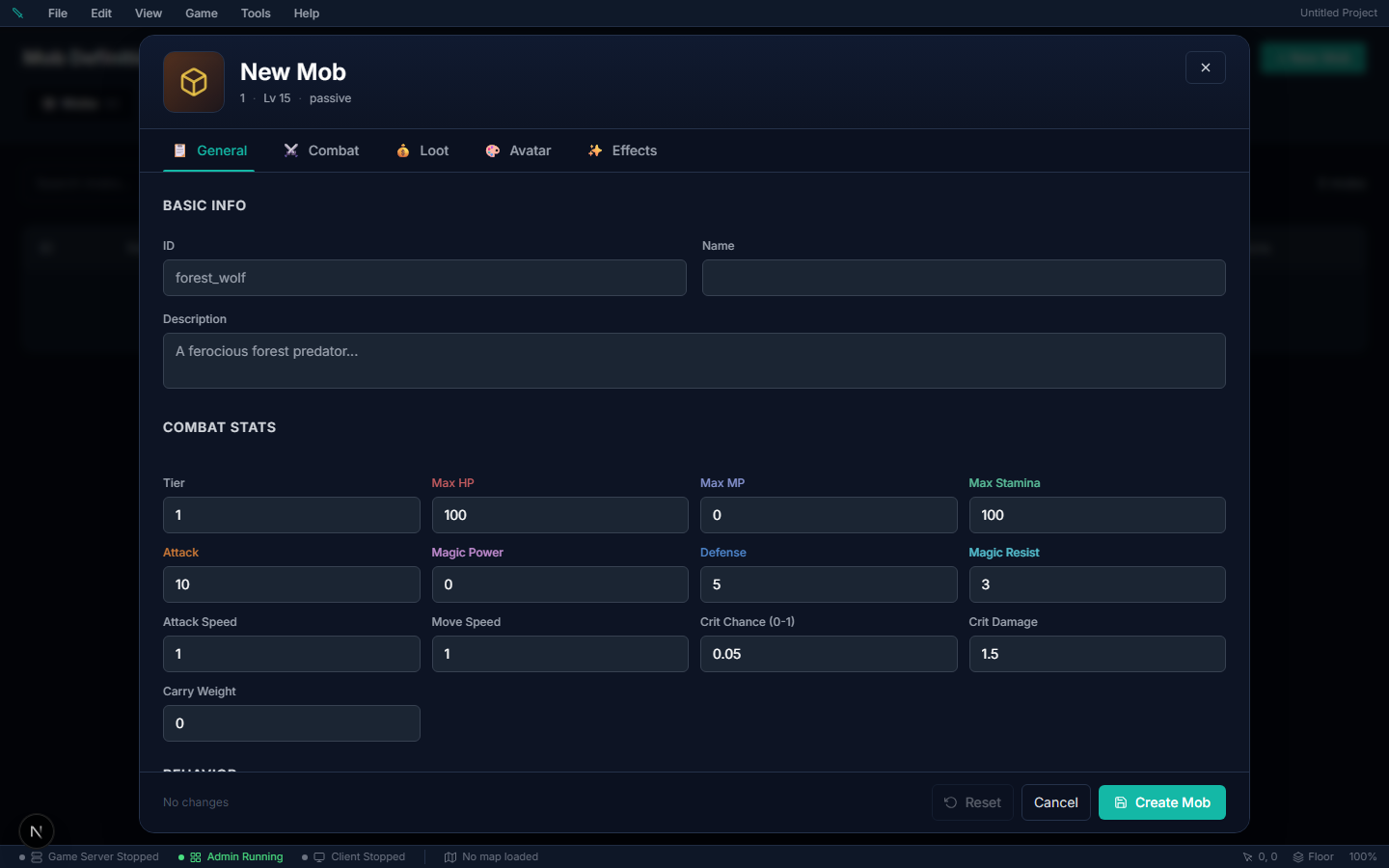
Creating a Mob#
| Property | Description |
|---|---|
| Name | Display name (e.g., "Forest Slime") |
| HP, Mana | Health and mana pools |
| Attack, Defense | Physical combat stats |
| Magic Power, Magic Resist | Magical combat stats |
| Level | Mob level (affects XP granted and difficulty) |
| AI Behavior | How the mob acts (see below) |
| Abilities | Which attacks/spells it can use |
| Loot Table | What items it drops when defeated |
| Sprite | Visual appearance and animations |
| Light Emission | Optional glow effect |
How hard a mob hits#
A mob's basic swing is its Primary Attack ability (Combat tab). Left on Basic melee (engine default), every swing deals 15 + half the mob's Attack, once every 2 seconds, before the target's armor. So Attack alone barely changes a mob's damage: a mob with Attack 2 still hits a new player for about 15.
- To make a weak starter monster, set its AI Behavior to Passive (it only fights back) and keep its HP low, or pick a weaker Primary Attack. An ability's own Base Damage and Cooldown replace the 15 and the 2 seconds.
- A fast ability makes a fast mob. A mob swings its Primary Attack every time that ability's cooldown allows, so giving a monster a player ability with a short cooldown (like Punch) can make it hit several times a second.
- Three aggressive mobs in one party all join the fight. Test a new monster against a level-1 character with Playtest before you ship it.
How Kill XP Is Paid Out#
A kill's XP is not pasted straight onto the character — it flows XP Reward → damage split → level scaling → skill split, and each step can shrink it:
- Damage split — the authored XP Reward is divided among everyone who damaged the mob, by damage share.
- Level ("con") scaling — only for mobs with a fixed level (auto-scale off): a mob 10 or more levels below its killer pays just 10% of its XP. Mobs set to auto-scale always pay full XP.
- Skill split — the surviving amount is divided across the skills the kill trains (the weapon type's linked skills, or the ability's), with a minimum of 1 each.
So a level-5 wolf with XP Reward 5, killed by a veteran character, pays 5 × 0.1 = 0.5 → 1 XP per skill — the floor every step rounds up to. If kills in your world read "1 XP" everywhere: raise XP Reward (values under ~20 disappear into the floors), and either switch mobs to auto-scale or keep their fixed levels near your players' levels.
Spawn Variants (different-looking spawns)#
One mob definition can spawn with more than one look — a wolf pack with grey, brown and rare white wolves is one wolf mob with two variants, not three definitions. The server rolls one look per spawn, so every player sees the same creature, and respawns re-roll naturally.
Where: Mob editor → Avatar tab → Spawn Variants, under the avatar editor.
How to set it up:
- Author the mob's base look in the Avatar editor as usual.
- Click + Add Variant and pick the variant's sprite sheet. Use a sheet laid out like the base (same frame grid) — the variant reuses the base look's layout and animations and only swaps the sheet.
- Set the weight. The base look always rolls with weight 1; each variant competes with its own weight — 1 is as common as the base, 0.1 is a rare skin, 0 turns the variant off without deleting it.
- Save. The next spawns (and respawns) roll among the looks; already-spawned mobs keep the look they rolled.
| Field | What it does |
|---|---|
| Sprite Sheet | The alternate sheet drawn for this variant. |
| Label | Optional editor-only name ("Albino"). Players never see it. |
| Weight | Spawn chance relative to the base look's fixed weight of 1. 0 = disabled. |
Gotchas:
- A variant only changes the look — stats, loot, abilities and name stay the mob's own. For a stronger rare, make a separate mob definition.
- Sheets with a different frame grid than the base will animate wrongly — the variant borrows the base's frame layout.
- The roll happens per spawn on the server; there is no way to force a specific variant at a specific spawn point.
- Rows with no sprite sheet picked are dropped on save.
AI Behaviors#
| Behavior | Description |
|---|---|
| Passive | Won't attack unless attacked first (the default) |
| Aggressive | Attacks players on sight within its aggro range |
| Territorial | Attacks only players who enter its home area |
| Patrol | Walks a set route, fights if provoked |
| Target dummy | Never moves, never attacks and never fights back. It stands where you put it and takes hits |
Target Dummies (practice targets)#
A target dummy is a mob that stands still and takes every hit without fighting back. Put one in a town or training yard and players can try out weapons, abilities and gear and see exactly how much damage they do.
Where: Mob editor → General tab → Behavior → AI Behavior → Target dummy.
How to set it up:
- Create a mob (or open the one you want to use) and give it a name and sprite, for example a straw dummy.
- On the General tab, set AI Behavior to Target dummy.
- Set Max HP high enough that a test lasts. A dummy can still die, and it respawns like any other mob.
- Set XP Reward to 0 and leave its loot empty, so players can't farm the dummy for XP or items.
- Save, then place it in a zone with a spawn rule or a placed spawn, the same as any mob.
| Setting | What it does on a dummy |
|---|---|
| AI Behavior: Target dummy | Turns off targeting, chasing and attacking completely. Getting hit doesn't make it fight back. |
| Max HP / Defense / Magic Resist | Still apply. Set them to match the enemy you want players to test against. |
| Element & status rates | Still apply, so you can test elemental weaknesses and status effects. |
| Scale with player | Still works. The dummy matches the level of the first player who hits it. |
| Aggro range, leash range, abilities, patrol | Ignored. A dummy never uses them. |
Gotchas:
- Passive is not the same thing. A passive mob fights back as soon as it's hit. Use Target dummy for anything that should never attack.
- Charm and taunt don't work on a dummy. Stun, root, sleep and fear still do, so you can test them. A dummy that gets knocked, pulled or scared off its spot walks back to it.
- It never drinks potions, even ones in its loot, so its HP only goes down from your hits.
- Mobs already in the world keep the behavior they spawned with. Dummies you placed on the map switch over when you publish. Mobs that come from a spawn rule switch over the next time the game server restarts.
How Mob AI Works#
Each mob follows a state machine:
- Idle — standing at spawn, looking for targets within its aggro range
- Patrol — walking a predefined route
- Chase — running toward a detected player
- Combat — using abilities via its weighted ability rotation (see below)
- Return — walking back to spawn if it gets too far away (leash range)
Key settings (Mob editor → Movement):
- Aggro range — how far the mob can spot players (default 5 tiles)
- Leash range — max distance from spawn before it resets and walks back (default 15 tiles)
A creature with no aggro or leash range of its own (an NPC left blank, a scripted spawn) uses the world defaults on Database → Tuning → Combat Config → Mob AI — see Mob AI Settings.
- Move speed — the calm wander/patrol pace, in tiles per second
- Chase speed — the sprint once it has a target. Set it above Move speed so the creature ambles on patrol and breaks into a run on the pull.
- Move frequency — how long it rests between wander decisions and at each patrol waypoint, in seconds. Leave it at 0 and the creature takes a randomised 1.4–3.6 second breather every time, so a line of guards doesn't march in lockstep. Set a number to pin the rest to exactly that long.
If the creature's sprite has more than one idle animation, each waypoint rest plays one of them at random — an easy way to make a patrol look alive without scripting it. Name the extra ones idle2, idle_look, and so on; the plain idle stays the default resting pose.
NPCs have the same three movement settings under their own Movement section, and events have a per-page Move frequency on the event editor's Movement row — so a wandering mob, a patrolling guard and a pacing shopkeeper are all tuned the same way.
Perception & Stealth#
When the stealth / encounterAI features are on, mobs use real perception instead of a flat radius. Each mob's perception profile has a sight radius, a sight cone (degrees), a hearing radius, and light sensitivity — so a stealthed player can slip past a mob's back or stay out of its cone and lamplight. This feeds the area-of-interest and aggro checks server-side.
Weighted Ability Rotation#
Rather than a fixed rotation, each mob ability carries a weight plus conditions — min/max range, the mob's own HP %, the target's HP %, and a minimum number of targets caught in an AoE. The AI picks among eligible abilities by weight, so casters kite, healers top up allies, and bombers wait for clustered targets.
Element & Status Traits#
Mobs can be tuned defensively and offensively:
- Element — an
elementIdplus element rates (resist/weakness multipliers) that plug into the element effectiveness matrix. - Status rates & immunities — per-status susceptibility multipliers and hard immunities (e.g. a slime that can't be poisoned).
Encounter Scripts (Bosses & Packs)#
An encounter script turns a mob into a scripted fight. Once the mob is pulled, its phases start on cue — at the pull, below an HP %, or after some seconds of fighting — and each phase runs its steps: cast an ability, summon adds, telegraph a hit, or enrage.
Where to author it: Database → Mobs → Encounters tab. The tab is there while the Encounter AI feature is on (it is on by default).
Set one up#
- Click + New Encounter and give it an ID and a Name.
- Pick the Boss / leader mob — the mob whose pull starts the fight.
- Click + Add phase and choose when it Starts.
- Click + Add step for each thing the boss does in that phase and fill in its fields. ↑ / ↓ reorder steps.
- Click Create (or Save). The script reaches your running game server straight away; on a hosted project, Publish carries it to a server with its own database.
Script fields#
| Field | What it does |
|---|---|
| ID | The script's permanent id, set when you create it. |
| Name | What the list shows. |
| Boss / leader mob | The mob that runs this script. Empty = an unattached template that does nothing. A mob runs one script — attach two and only one runs. |
| Enabled | Off keeps the script saved but dormant; the mob fights with its normal AI. |
| Shared aggro on pull | The boss's monster party, and every add it summons, attack whoever the boss is fighting. |
Phase fields#
| Field | What it does |
|---|---|
| Phase ID | Unique within the script. |
| Starts | When the fight starts, When the boss falls below an HP %, or After some seconds of fighting. |
| Below HP % / Seconds | The threshold for the last two. 50 = half health. |
Each phase runs once per fight, and all of its steps run together, top to bottom.
Steps#
| Step | Fields |
|---|---|
| Cast an ability | Ability, and Aimed at: the boss's current target, a random player it is fighting, or the boss itself. |
| Summon adds | Mob, How many (1–20) and Scatter radius in tiles (empty = 3). |
| Telegraph a hit | A ground warning, then a hit. Shape and Size (tiles) of the danger zone; Warning time in ms — the players' window to step out; the Hit ability cast at the marked spot when the warning ends (empty = a warning only); and the Warning effect (empty = the engine default default.telegraph, the same ground warning area abilities use). |
| Enrage | Damage × (empty = 1.5) and Speed × (empty = 1.3) for the rest of the fight. A boss enrages once. |
Gotchas#
- A busy boss still casts. If the boss is mid-cast or on cooldown when a step fires, the cast waits and goes off as soon as the boss is free — for up to 5 seconds, then it is dropped.
- Pick an area ability for a dodgeable telegraph. The warning is drawn where the target stood when it appeared, and an area hit is aimed at that spot, so a player who steps out is safe. A single-target ability hits its target wherever they stand.
- A fight already under way keeps its script. Saving changes the next pull, not the current one.
- Save refuses an incomplete step and says where — for example Phase 2 (Burn), step 1: pick an ability.
- Older scripts with a leader role or an Assign roles step still load. Neither ever did anything in game; the editor marks an Assign roles step so you can remove it.
Death VFX#
Each mob can select a per-mob Death VFX from the VFX editor. Leave it unset and the mob uses the engine default (default.death_burst), which is itself an editable VFX definition.
Spawn VFX#
Enemies announce their arrival with a Spawn VFX — the effect that plays where a monster appears. It matters most for the spawns a player did not walk up to: arena horde waves, event spawns, summons, and respawns landing in view.
Where to author it: Mobs → pick a mob → Effects tab → Spawn VFX.
| Setting | What it does |
|---|---|
| Engine default (Enemy Spawn) | Plays the shared default.spawn_burst effect — a ground mark, a flash, and motes gathering upward. |
| A VFX definition | Plays that effect instead, for this monster only. Build it in the VFX editor. |
Two things to know:
- Editing the default restyles every spawn.
default.spawn_burstis an ordinary VFX definition, so open it in the VFX editor and change it once to change every monster that has no override. - Deleting the default turns spawn effects off. Unlike the death burst, there is no built-in fallback drawing — if
default.spawn_burstis gone and a monster sets no Spawn VFX of its own, its arrival plays nothing. That is the supported way to disable spawn effects world-wide.
The effect plays for every spawn route — world spawn rules, event spawn mob commands, dungeon and instance population, and arena horde waves — so you author it once per monster rather than per spawner.
Monster Parties#
Group up to 5 mobs into a Monster Party with assigned roles:
- Tank — high HP, draws attention
- Damage — high attack, less durable
- Support — heals or buffs other mobs
Parties spawn together as a coordinated group.
Spawn Rules#
A spawn rule populates one zone with one monster party. Author them in Mobs → Spawn Rules.
| Setting | What it does |
|---|---|
| Zone | Which zone the rule populates |
| Biome | Only spawn on tiles painted with this biome. Accepts several, comma-separated (plains,forest) |
| Max count | How many copies of the whole party live at once. A 3-mob party with max count 4 puts 12 mobs in the zone |
| Respawn interval | Seconds after the party dies before it comes back, at the same spot |
| Time condition | The pack only exists at this time of day |
| Weather condition | The pack only exists during this weather |
How the conditions behave#
A rule with a time or weather condition is checked continuously, not just at world start:
- When the condition starts matching, the pack spawns (up to max count) within about ten seconds.
- When it stops matching, the pack is removed — except any mob currently fighting a player. Those finish their fight and simply don't come back.
- A pack that died during its window waits for the window to return instead of respawning outside it. A night-only pack killed at 3am comes back the next night, not at noon.
Leave both conditions on Any for a pack that should always be there.
How the biome filter behaves#
The biome is a real constraint: the spawner sweeps the zone for tiles painted with that biome and places the party there, even when the region is a small painted patch on a big map.
The one exception is a zone where the biome isn't painted anywhere — typically an imported map whose tiles carry no biome tags. Rather than leaving the map empty, the pack spawns on any walkable tile and the server log says so:
[MobAI] Spawned 24 mobs in 6 party groups (24 from DB rules, 3 placed outside
their rule biome — the zone has no tiles tagged with that biome (paint biome
regions to constrain them))
If you see that line, paint the biome region you meant and re-publish.
Gotchas#
- Mobs never spawn on top of you — a candidate tile within 5 tiles of a player, inside a no-spawn land claim, or on unwalkable terrain is skipped.
- Editing rules re-seeds the zone. Publishing spawn-rule changes removes the mobs those rules created and spawns fresh ones; hand-placed and event mobs are untouched.
- World events can scale respawns. A "spawn rate" world event multiplies every rule's interval while it runs.
Placing One Monster by Hand#
When you want one monster on one exact tile (a guard at a bridge, a boss in its lair), place it on the map instead of writing a spawn rule.
- In the map editor, switch to the Events layer.
- Right-click the tile and choose Mob (or drag it from Palette → Mobs).
- Pick the mob, then Save the map and Publish.
A hand-placed monster fights like any other: it uses its own AI Behavior, aggro range and abilities. When it dies it comes back on the same tile.
| Custom property | What it does |
|---|---|
| (none) | A mob respawns 60 seconds after it dies. A boss stays dead |
respawnSeconds = a number | Respawn after that many seconds instead. Works on bosses too |
respawnSeconds = 0 | Never respawn. Good for a one-time ambush |
Add the property in the placed mob's Event Properties → Custom Properties.
Gotchas#
- Publishing resets placed monsters. A monster that is waiting to respawn when you publish comes back at once, with the respawn time you set.
- Moving or deleting the placement moves or removes the monster on the next publish. You don't need to restart the server.
- Want a group, or monsters that wander an area? Use a spawn rule instead. A placed monster is one mob on one tile.
Loot, gear and potions#
A mob can drop from three places, and only one of them is something the mob gets to use:
| Source | Where | When it rolls | Can the mob use it? |
|---|---|---|---|
| Assigned Loot Tables | Loot tab | Once, when the mob spawns | Yes. This is its inventory: it wears the gear and drinks the potions, and drops whatever is left |
| Direct Loot Drops | Loot tab | When it dies | No. These always just drop |
| World Loot Pool | Loot tab | When it dies | No. These always just drop |
So a mob given a loot table with a sword wears that sword, and the sword in its hand is the sword that drops. A table that gives it five potions lets it drink two in a fight and drop three. A sword or potion added under Direct Loot Drops never shows in its hand and is never drunk; it simply drops by its chance when the mob dies.
Setting it up
- Build the kit under Database → Loot Tables: the gear and potions this kind of mob carries.
- Open Database → Mobs, edit the mob, and on the Loot tab add that table under Assigned Loot Tables.
- On the Combat tab, tick the Equip Slots the mob may wear from its tables (Main Hand by default).
- Back on Loot, leave Drinks what it carries on for a mob that should use its potions, or turn it off for one that should keep them for the player.
- Add anything that should only ever drop under Direct Loot Drops.
- Save and publish. Mobs that spawn or respawn after that use the new setup.
| Field | Where | What it does |
|---|---|---|
| Assigned Loot Tables | Loot tab | Each table's rows roll once at spawn into the mob's inventory. Rows for the same item stack. |
| Equip Slots | Combat tab | The slots the mob may fill from its tables. It picks the best piece per slot; anything else it carries unworn and still drops. |
| Drinks what it carries | Loot tab | On by default. Below half health the mob drinks one healing potion or food from its tables' items, at most one every 5 seconds. Each one it drinks is gone from its drop. |
| Direct Loot Drops | Loot tab | Rolled when the mob dies, each row by its own chance and quantity. Never worn or drunk. |
| World Loot Pool | Loot tab | Rolled when the mob dies, merged with the direct drops or replacing them per World Loot Mode. Never worn or drunk. |
What a mob will drink: potions and food from its tables that restore HP. A potion set to restore a percent heals that percent of the mob's own max HP. Mana-only potions, gear and materials are never drunk.
Gotchas
- Re-save the mob after editing a loot table. A table's rows are copied onto the mob when you save it, so a change to the table reaches a mob the next time you save that mob.
- Mobs made before this change have only direct drops. Their loot was saved as one list, so every row now drops at death and nothing is worn or drunk. Move the rows you want the mob to use into a loot table and assign it.
- Edits reach new spawns, not standing mobs. A mob already in the world keeps the inventory it rolled. Players see the change as mobs respawn.
- Loot find is a second look, not a reroll. A player's loot find bonus gives the table rows the mob did not roll a lucky extra chance when they kill it, and raises the odds of its direct drops. It never adds back what the mob drank.
- A mob can heal through a fight. A tough mob with a stack of potions lasts noticeably longer. Lower the quantity, pick smaller potions, or turn Drinks what it carries off.
- Mobs you place by hand, spawn from the admin tools, or bring in with a world event or territory boss never spawned with an inventory, so they roll everything once when they die. They don't wear or drink loot.
- The world's loot multiplier still scales the quantity of each stack as it drops.
Animation gotchas
- A mob's own animation list wins. When a mob's Avatar tab lists any animations, the mob uses that list, not its sprite's. Picking a sprite copies its animations onto the mob, so an Idle you add on the Sprites page later never reaches it. Add the clip on the mob's Avatar tab, or pick the sprite there again.
- Clips with a direction in the name work. Idle_Down, Idle Down and idle-down are all read as the down-facing idle; keep one set per facing.
- Run plays whenever a character moves at full pace: keyboard movement, a fully pushed stick, or a click three or more tiles away. Walk is used for short clicks and a light stick push. With no Run clip, Walk plays at every pace. Give Run Loop on and real frames.
- After deleting and re-adding clips, check each clip's Row. A new clip takes the next free row, which may not be the row its art is on.